> ## Documentation Index
> Fetch the complete documentation index at: https://docs.agentmark.co/llms.txt
> Use this file to discover all available pages before exploring further.
# Tools and agents
> Reference tools by name in prompts, resolve them to implementations at your call site, and build multi-step agent workflows
Tools let your prompts call external functions such as web searches, calculations, and API calls. Agents use tools across multiple LLM calls to solve multi-step tasks.
AgentMark keeps tools out of the client. A prompt's frontmatter lists tool **names**; the neutral render surfaces those names in `text_config.tools`. The AgentMark client doesn't hold or execute tool implementations: **you resolve each name to an implementation where you call the model** (in your SDK call or an [executor](/getting-started/client-setup#connect-your-sdk)). The render carries names; your call site owns the implementations.
## Reference tools by name in frontmatter
List the tools a prompt can use under `text_config.tools`. Each entry is a name, a string you'll later map to a real implementation:
```jsx calculator.prompt.mdx theme={null}
---
name: calculator
text_config:
model_name: openai/gpt-5-mini
tools:
- calculate
---
You are a math tutor that can perform calculations. Use the calculate tool when you need to compute something.
What's 235 * 18 plus 42?
```
The tool implementation (description, schema, execute function) lives in your code, not in the frontmatter. The name `calculate` is the contract between the prompt and your call site.
## Define a tool implementation
Define each tool however your SDK expects. With the Vercel AI SDK, that's the `ai` package's `tool()` helper, which takes a description, an `inputSchema` (a Zod schema for its input), and an `execute` function:
```typescript theme={null}
import { tool } from "ai";
import { z } from "zod";
const calculateTool = tool({
description: "Performs basic arithmetic calculations",
inputSchema: z.object({
expression: z.string().describe("The mathematical expression to evaluate"),
}),
execute: async ({ expression }) => {
// DEMO ONLY — Function() runs arbitrary JS. Never pass untrusted input here; use a real expression parser in production.
const result = Function(`"use strict"; return (${expression})`)();
return { result };
},
});
```
This `tool()` value is a native AI SDK object; it isn't passed to `createAgentMark`. You hold it in your own code and look it up by name when you call the model.
## Resolve names to implementations at your call site
Keep a lookup from tool name to implementation (a plain `Record`) and select the entries the prompt asked for. The neutral render gives you the requested names in `text_config.tools`; pass the resolved implementations to your SDK call:
```typescript theme={null}
import { client } from "./agentmark.client";
import { generateText, tool, type Tool } from "ai";
import { openai } from "@ai-sdk/openai";
import { z } from "zod";
const calculateTool = tool({
description: "Performs basic arithmetic calculations",
inputSchema: z.object({
expression: z.string().describe("The mathematical expression to evaluate"),
}),
execute: async ({ expression }) => {
const result = Function(`"use strict"; return (${expression})`)();
return { result };
},
});
// Your own registry of implementations, keyed by the names used in frontmatter.
const toolRegistry: Record = {
calculate: calculateTool,
};
function resolveTools(names: string[] = []): Record {
return Object.fromEntries(
names.map((name) => {
const impl = toolRegistry[name];
if (!impl) throw new Error(`Tool not registered: ${name}`);
return [name, impl];
})
);
}
const prompt = await client.loadTextPrompt("calculator.prompt.mdx");
const { messages, text_config } = await prompt.format({ props: {} });
const result = await generateText({
model: openai(text_config.model_name.replace(/^openai\//, "")),
messages,
tools: resolveTools(text_config.tools), // map names → implementations here
});
console.log(result.text);
```
To move the same logic into a reusable [executor](/getting-started/client-setup#connect-your-sdk), so AgentMark Cloud can run the prompt too, see [Connect your SDK](/getting-started/client-setup#connect-your-sdk): the executor's handlers receive the neutral render, so the same `Record` lookup applies unchanged.
## MCP tools in frontmatter
Tool entries can also name Model Context Protocol tools with the `mcp://{server}/{tool}` syntax, or `mcp://{server}/*` to include every tool a server exports. The render surfaces these names like any other tool entry; your runtime connects the MCP server when it makes the call. See [MCP integration](/build/mcp) for declaring servers in `agentmark.json`, the `mcp://` URI syntax, and connecting servers at your call site.
## Agents
Set `max_calls` to bound a multi-step agent loop. AgentMark surfaces the value in `text_config.max_calls`; your SDK or executor reads it to cap how many times the model may call tools before finishing. With the Vercel AI SDK, you'd map it to `stopWhen: stepCountIs(max_calls)`:
```jsx travel-agent.prompt.mdx theme={null}
---
name: travel-agent
text_config:
model_name: openai/gpt-5-mini
max_calls: 3
tools:
- search_flights
- check_weather
---
You are a helpful travel assistant that can search flights and check weather conditions.
When helping users plan trips:
1. Search for available flights
2. Check the weather at the destination
3. Make recommendations based on both flight options and weather
I want to fly from San Francisco to New York next week. Can you help me plan my trip?
```
The frontmatter declares the budget and the tool names; the loop itself runs in your SDK call or executor, which honors `max_calls` and feeds tool results back to the model until the task is complete.
## Testing agents in the Dashboard
**Cloud feature.** Test agents visually in the [AgentMark Dashboard](https://app.agentmark.co).
Run agents directly in the Dashboard to see how they use tools in real time:
The agent panel shows each step the model takes: the tool it called, the arguments it passed, the tool's response, and the model's next move. You can inspect the full tool-call trace without leaving the editor.
View configured tools and their schemas:
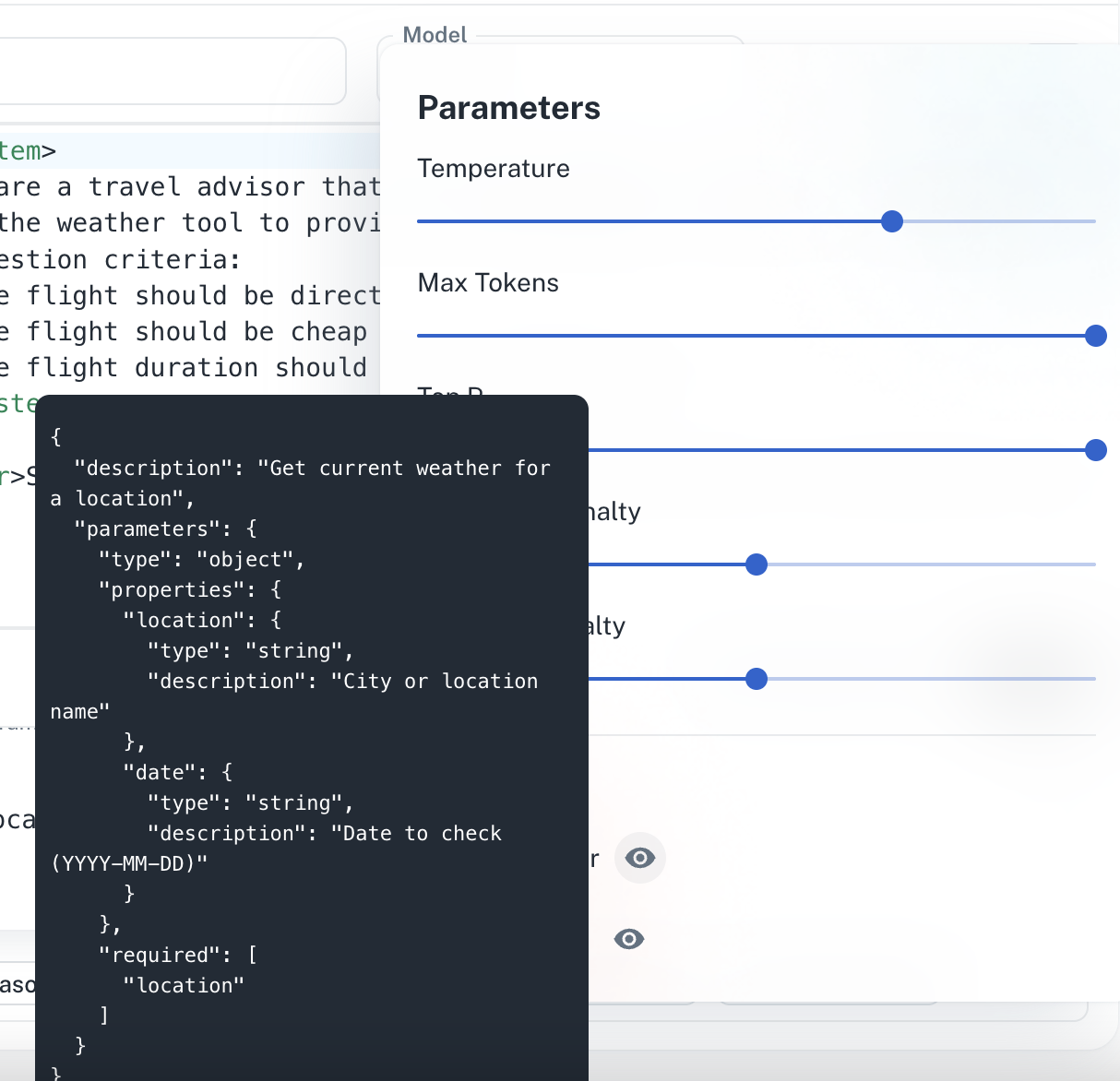 The tool-schema panel lists every tool referenced in your prompt's frontmatter, with its description and the full JSON schema for its inputs.
## Best practices
1. Keep tools focused on a single responsibility.
2. Provide clear descriptions to help the LLM use tools appropriately.
3. Handle errors gracefully and return informative error messages.
4. Use descriptive parameter names and include helpful descriptions.
5. Resolve tool names in one place (a shared registry or executor) so prompts and your call site stay in sync.
The tool-schema panel lists every tool referenced in your prompt's frontmatter, with its description and the full JSON schema for its inputs.
## Best practices
1. Keep tools focused on a single responsibility.
2. Provide clear descriptions to help the LLM use tools appropriately.
3. Handle errors gracefully and return informative error messages.
4. Use descriptive parameter names and include helpful descriptions.
5. Resolve tool names in one place (a shared registry or executor) so prompts and your call site stay in sync.
Have questions?
Reach out any time: