> ## Documentation Index
> Fetch the complete documentation index at: https://docs.agentmark.co/llms.txt
> Use this file to discover all available pages before exploring further.
# Evaluate
> Test and improve your prompts with datasets, evaluators, experiments, and annotations
AgentMark gives you two ways to test prompts, and they share the same building blocks. In **Cloud**, you run and review experiments in the [AgentMark Dashboard](https://app.agentmark.co), dispatched to the eval worker through the gateway's `/v1/evals` routes. In **Local**, you keep datasets as JSONL files alongside your prompts, write eval functions in code, and run experiments from the CLI.
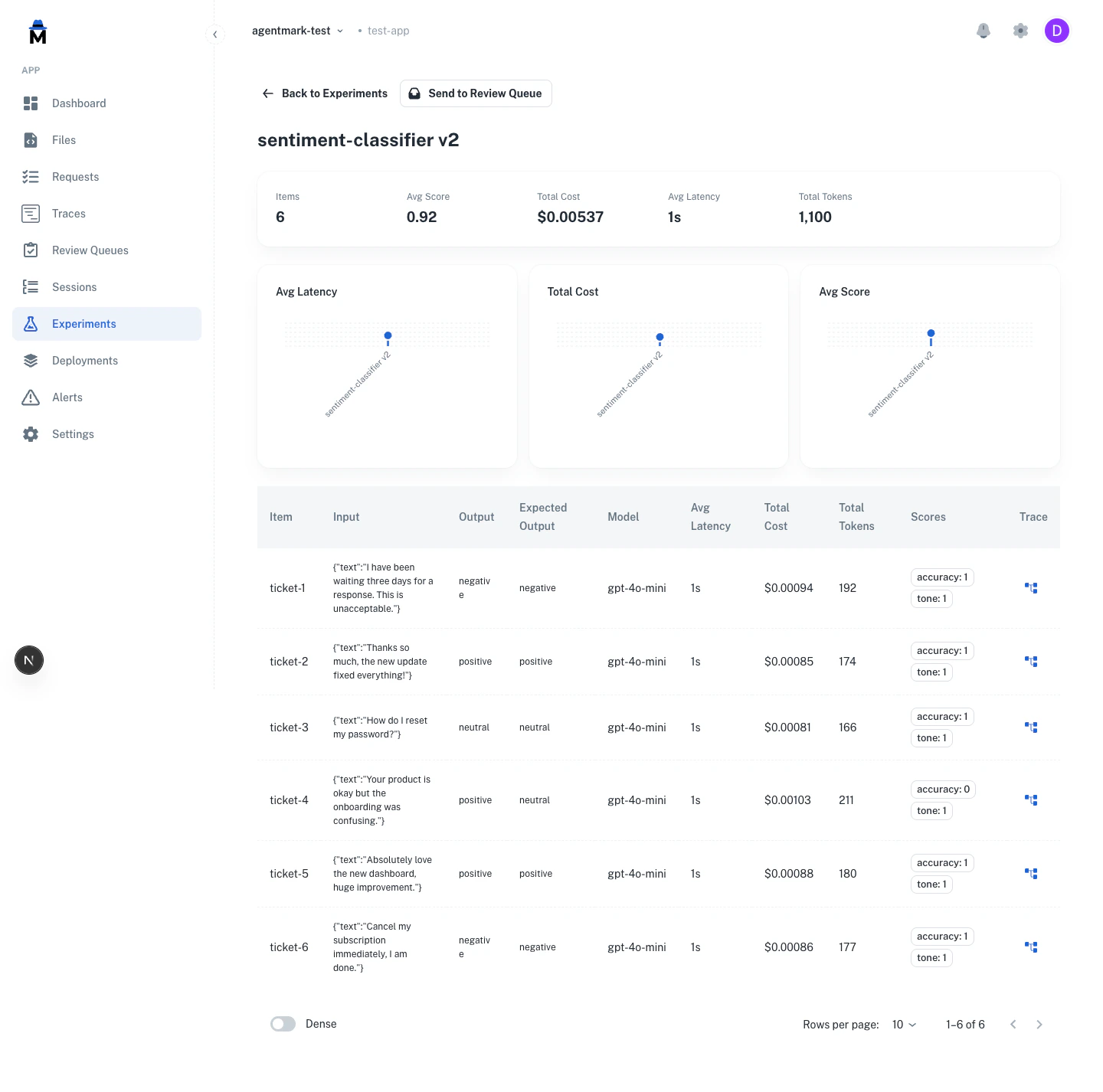 The experiment detail view shows each dataset row's input, the AI output, expected output, and evaluator scores, alongside aggregate metrics for the run (average score, average latency, total cost, total tokens).
## Why test prompts?
LLM outputs are non-deterministic. The same prompt can produce different results. Testing helps you:
* **Catch regressions**: know when prompt changes break existing functionality
* **Validate quality**: confirm outputs meet your standards across varied scenarios
* **Measure improvements**: quantify whether prompt iterations actually perform better
* **Build confidence**: deploy changes backed by data, not guesswork
## Testing workflow
Add a JSONL file to your `agentmark/` directory. Each line is one test case.
Add score configs to `agentmark.json` under `scores`, and register eval functions on the client that backs your deployed handler.
Push to your connected branch. The deployment pipeline syncs your datasets and score configs to AgentMark Cloud.
Open **Experiments** in the Dashboard, click **New Experiment**, choose the prompt, dataset, and evaluations, and run. Results stream in live, then open in the experiment detail view.
Define test inputs in a JSONL file. Each line is one test case.
Create eval functions that score outputs. Register them in your client.
Add `test_settings.dataset` and `test_settings.evals` to your prompt frontmatter.
Execute `agentmark run-experiment` to test your prompt against the dataset.
**Prerequisites:** You must have `agentmark dev` running in a separate terminal before running experiments.
## Core concepts
### Datasets
A dataset is a set of test inputs, each with an optional expected output, that you run your prompt against. Cover the scenarios it has to handle: common cases, edge cases, and failure modes.
```jsonl theme={null}
{"input": {"text": "Great product!"}, "expected_output": "positive"}
{"input": {"text": "Terrible experience"}, "expected_output": "negative"}
{"input": {"text": ""}, "expected_output": "neutral"}
```
Datasets live as JSONL files in your repo and sync to AgentMark Cloud through the deployment pipeline. In the Dashboard you pick a synced dataset when you create an experiment or configure a review queue. The **Add to Dataset** flow during annotation review and the REST API both append rows.
Store JSONL files alongside your prompts in the `agentmark/` directory and run them with the CLI.
[Learn more about datasets →](/evaluate/datasets)
### Evaluations
An evaluation (eval) is a function you write that scores a prompt's output and returns pass or fail. Each eval is your definition of a good output, in code: for example, "the classification matches the expected label."
```typescript theme={null}
export const accuracy = async ({ output, expectedOutput }) => {
const match = output.trim().toLowerCase() === expectedOutput.trim().toLowerCase();
return { passed: match, score: match ? 1 : 0 };
};
```
You declare score configs in `agentmark.json` under `scores`, and the deployment pipeline syncs them to AgentMark Cloud. Eval functions run during experiments on your deployed handler. In the New Experiment dialog you select which registered evals to run, and results appear as per-row scores and aggregates in the experiment detail view.
Write eval functions in code, register them in your client, and run them through the CLI with `run-experiment`.
[Learn more about evaluations →](/evaluate/writing-evals)
### Experiments
An experiment runs a prompt against a dataset and scores each row with your evals. Run one to check a prompt change, compare model configurations, or gate a deploy on a pass-rate threshold.
Run experiments from the **Experiments** page in the Dashboard. Review results with per-row score drill-down, aggregate metrics, and charts, and compare runs side by side.
Run from the CLI and view results as tables in your terminal:
```bash theme={null}
agentmark run-experiment agentmark/.prompt.mdx
```
[Learn more about running experiments →](/evaluate/running-experiments)
### Annotations
**Cloud feature.** Annotations are available in the [AgentMark Dashboard](https://app.agentmark.co).
Manually label and score traces for human-in-the-loop evaluation. Add scores, labels, and detailed reasoning to any span, so human judgment backs up your automated evals.
[Learn more about annotations →](/evaluate/annotations)
## Testing strategies
* **Start small** (5-10 cases), then grow with real data
* **Test multiple dimensions**: accuracy, completeness, tone, format
* **Version control everything**: datasets live alongside prompts in your repo
* **Run in CI/CD**: gate deployments on pass-rate thresholds
## Programmatic access
Query datasets, experiments, runs, and prompt execution logs through the [REST API](/api-reference/overview), or from an IDE agent via the [`agentmark-mcp`](/coding-agents/gateway-mcp) MCP server. Use either to build custom reporting, export evaluation results to external tools, or integrate experiment data into CI/CD pipelines.
```bash theme={null}
# List datasets and experiments from the local dev server
curl "http://localhost:9418/v1/datasets"
curl "http://localhost:9418/v1/experiments?limit=10"
# Get detailed results for a specific experiment
curl "http://localhost:9418/v1/experiments/"
# List traces produced by a specific experiment run
# (filter /v1/traces by dataset_run_id)
curl "http://localhost:9418/v1/traces?dataset_run_id="
# Against Cloud, set the auth + app headers:
curl "https://api.agentmark.co/v1/experiments?limit=10" \
-H "Authorization: Bearer $AGENTMARK_API_KEY" \
-H "X-Agentmark-App-Id: $AGENTMARK_APP_ID"
```
The local dev server and the AgentMark Cloud gateway share the same `/v1/*` wire contract. A small number of routes are environment-specific. See the `Where` column in [API reference → Available endpoints](/api-reference/overview#available-endpoints).
## Next steps
Create test datasets
Write evaluation functions
Execute tests with the CLI or Dashboard
Human-in-the-loop scoring
The experiment detail view shows each dataset row's input, the AI output, expected output, and evaluator scores, alongside aggregate metrics for the run (average score, average latency, total cost, total tokens).
## Why test prompts?
LLM outputs are non-deterministic. The same prompt can produce different results. Testing helps you:
* **Catch regressions**: know when prompt changes break existing functionality
* **Validate quality**: confirm outputs meet your standards across varied scenarios
* **Measure improvements**: quantify whether prompt iterations actually perform better
* **Build confidence**: deploy changes backed by data, not guesswork
## Testing workflow
Add a JSONL file to your `agentmark/` directory. Each line is one test case.
Add score configs to `agentmark.json` under `scores`, and register eval functions on the client that backs your deployed handler.
Push to your connected branch. The deployment pipeline syncs your datasets and score configs to AgentMark Cloud.
Open **Experiments** in the Dashboard, click **New Experiment**, choose the prompt, dataset, and evaluations, and run. Results stream in live, then open in the experiment detail view.
Define test inputs in a JSONL file. Each line is one test case.
Create eval functions that score outputs. Register them in your client.
Add `test_settings.dataset` and `test_settings.evals` to your prompt frontmatter.
Execute `agentmark run-experiment` to test your prompt against the dataset.
**Prerequisites:** You must have `agentmark dev` running in a separate terminal before running experiments.
## Core concepts
### Datasets
A dataset is a set of test inputs, each with an optional expected output, that you run your prompt against. Cover the scenarios it has to handle: common cases, edge cases, and failure modes.
```jsonl theme={null}
{"input": {"text": "Great product!"}, "expected_output": "positive"}
{"input": {"text": "Terrible experience"}, "expected_output": "negative"}
{"input": {"text": ""}, "expected_output": "neutral"}
```
Datasets live as JSONL files in your repo and sync to AgentMark Cloud through the deployment pipeline. In the Dashboard you pick a synced dataset when you create an experiment or configure a review queue. The **Add to Dataset** flow during annotation review and the REST API both append rows.
Store JSONL files alongside your prompts in the `agentmark/` directory and run them with the CLI.
[Learn more about datasets →](/evaluate/datasets)
### Evaluations
An evaluation (eval) is a function you write that scores a prompt's output and returns pass or fail. Each eval is your definition of a good output, in code: for example, "the classification matches the expected label."
```typescript theme={null}
export const accuracy = async ({ output, expectedOutput }) => {
const match = output.trim().toLowerCase() === expectedOutput.trim().toLowerCase();
return { passed: match, score: match ? 1 : 0 };
};
```
You declare score configs in `agentmark.json` under `scores`, and the deployment pipeline syncs them to AgentMark Cloud. Eval functions run during experiments on your deployed handler. In the New Experiment dialog you select which registered evals to run, and results appear as per-row scores and aggregates in the experiment detail view.
Write eval functions in code, register them in your client, and run them through the CLI with `run-experiment`.
[Learn more about evaluations →](/evaluate/writing-evals)
### Experiments
An experiment runs a prompt against a dataset and scores each row with your evals. Run one to check a prompt change, compare model configurations, or gate a deploy on a pass-rate threshold.
Run experiments from the **Experiments** page in the Dashboard. Review results with per-row score drill-down, aggregate metrics, and charts, and compare runs side by side.
Run from the CLI and view results as tables in your terminal:
```bash theme={null}
agentmark run-experiment agentmark/.prompt.mdx
```
[Learn more about running experiments →](/evaluate/running-experiments)
### Annotations
**Cloud feature.** Annotations are available in the [AgentMark Dashboard](https://app.agentmark.co).
Manually label and score traces for human-in-the-loop evaluation. Add scores, labels, and detailed reasoning to any span, so human judgment backs up your automated evals.
[Learn more about annotations →](/evaluate/annotations)
## Testing strategies
* **Start small** (5-10 cases), then grow with real data
* **Test multiple dimensions**: accuracy, completeness, tone, format
* **Version control everything**: datasets live alongside prompts in your repo
* **Run in CI/CD**: gate deployments on pass-rate thresholds
## Programmatic access
Query datasets, experiments, runs, and prompt execution logs through the [REST API](/api-reference/overview), or from an IDE agent via the [`agentmark-mcp`](/coding-agents/gateway-mcp) MCP server. Use either to build custom reporting, export evaluation results to external tools, or integrate experiment data into CI/CD pipelines.
```bash theme={null}
# List datasets and experiments from the local dev server
curl "http://localhost:9418/v1/datasets"
curl "http://localhost:9418/v1/experiments?limit=10"
# Get detailed results for a specific experiment
curl "http://localhost:9418/v1/experiments/"
# List traces produced by a specific experiment run
# (filter /v1/traces by dataset_run_id)
curl "http://localhost:9418/v1/traces?dataset_run_id="
# Against Cloud, set the auth + app headers:
curl "https://api.agentmark.co/v1/experiments?limit=10" \
-H "Authorization: Bearer $AGENTMARK_API_KEY" \
-H "X-Agentmark-App-Id: $AGENTMARK_APP_ID"
```
The local dev server and the AgentMark Cloud gateway share the same `/v1/*` wire contract. A small number of routes are environment-specific. See the `Where` column in [API reference → Available endpoints](/api-reference/overview#available-endpoints).
## Next steps
Create test datasets
Write evaluation functions
Execute tests with the CLI or Dashboard
Human-in-the-loop scoring
Have questions?
Reach out any time: