> ## Documentation Index
> Fetch the complete documentation index at: https://docs.agentmark.co/llms.txt
> Use this file to discover all available pages before exploring further.
# Running experiments
> Test prompts with datasets in the Dashboard, CLI, or SDK
Run prompts against datasets with automatic evaluation to validate quality and consistency. In Cloud, you create and review experiments in the [AgentMark Dashboard](https://app.agentmark.co), dispatched to your hosted client. In Local, you run experiments from the CLI against JSONL files on disk.
## Experiments in the Dashboard
The Dashboard runs experiments using the evals registered on your hosted client. Open **Experiments** (flask icon) in the sidebar to get started.
Running an experiment from the Dashboard requires the app to have a hosted client registered: the runner that calls your SDK. If it isn't, the dialog returns an "app not connected" error. See [Client setup](/getting-started/client-setup) to build and host the client ([Connect your SDK](/getting-started/client-setup#connect-your-sdk) for the executor it calls).
### Browse the experiments list
The Experiments page is a paginated list of every run in your app. Filter it by **prompt name** and **dataset path** to find a specific run.
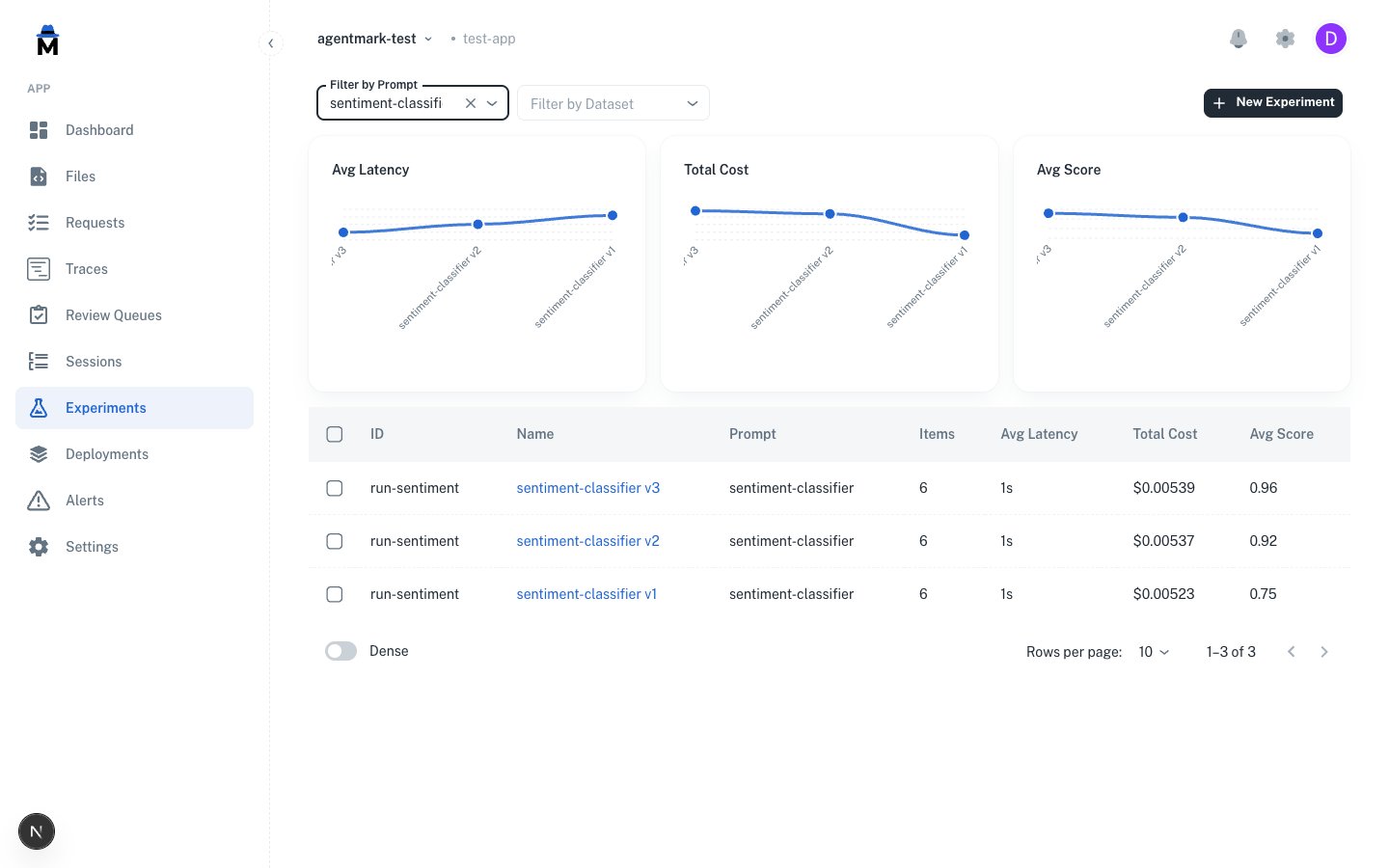 The Experiments list shows each run as a row, with filters for prompt name and dataset path and a **New Experiment** button in the top-right. Comparison charts sit above the list: average latency, total cost, and average score across the runs. Select 2 to 3 runs to enable **Compare**.
Running an experiment requires the `experiment.run` permission.
### Create and run an experiment
Click **New Experiment** to open the dialog.
The Experiments list shows each run as a row, with filters for prompt name and dataset path and a **New Experiment** button in the top-right. Comparison charts sit above the list: average latency, total cost, and average score across the runs. Select 2 to 3 runs to enable **Compare**.
Running an experiment requires the `experiment.run` permission.
### Create and run an experiment
Click **New Experiment** to open the dialog.
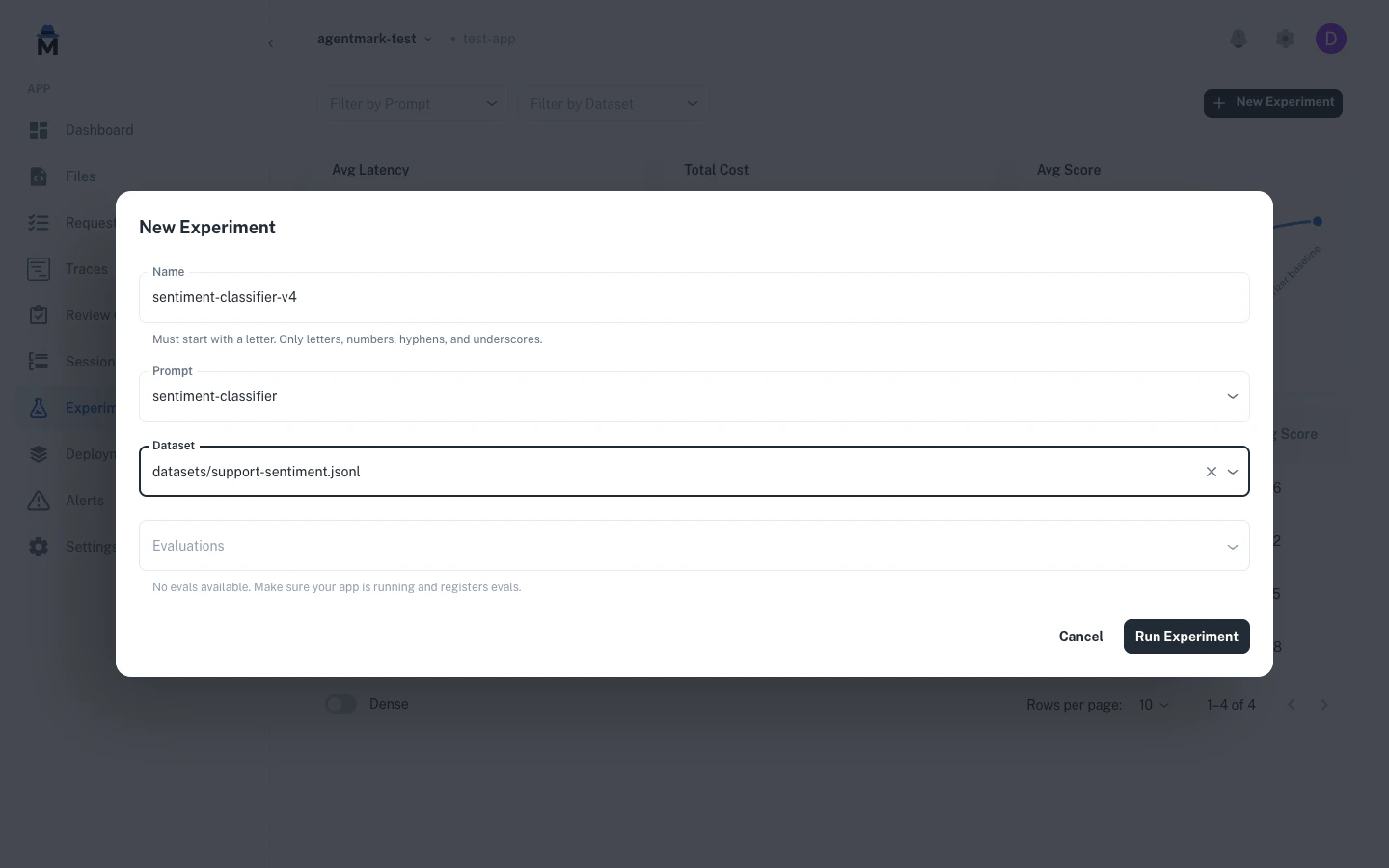 The New Experiment dialog has four fields: **Name**, **Prompt**, **Dataset**, and **Evaluations** (a multi-select populated from the evals your deployed handler registers). Selecting a prompt auto-fills the dataset and evaluations from its `test_settings` frontmatter.
The **Name** must start with a letter and may contain letters, numbers, hyphens, and underscores, up to 100 characters.
Enter a **Name** that starts with a letter.
Pick the **Prompt** to test. The **Dataset** and **Evaluations** auto-fill from its `test_settings`.
Adjust **Dataset** and **Evaluations** if you want to run against a different dataset or eval set.
Click **Run Experiment**. Results stream in live, then open in the experiment detail view.
As the run executes, results stream in row by row, and a summary reports the item count and total tokens when it finishes. Open the experiment to review the full results.
### Read the experiment detail
Click any experiment to open its detail view.
The New Experiment dialog has four fields: **Name**, **Prompt**, **Dataset**, and **Evaluations** (a multi-select populated from the evals your deployed handler registers). Selecting a prompt auto-fills the dataset and evaluations from its `test_settings` frontmatter.
The **Name** must start with a letter and may contain letters, numbers, hyphens, and underscores, up to 100 characters.
Enter a **Name** that starts with a letter.
Pick the **Prompt** to test. The **Dataset** and **Evaluations** auto-fill from its `test_settings`.
Adjust **Dataset** and **Evaluations** if you want to run against a different dataset or eval set.
Click **Run Experiment**. Results stream in live, then open in the experiment detail view.
As the run executes, results stream in row by row, and a summary reports the item count and total tokens when it finishes. Open the experiment to review the full results.
### Read the experiment detail
Click any experiment to open its detail view.
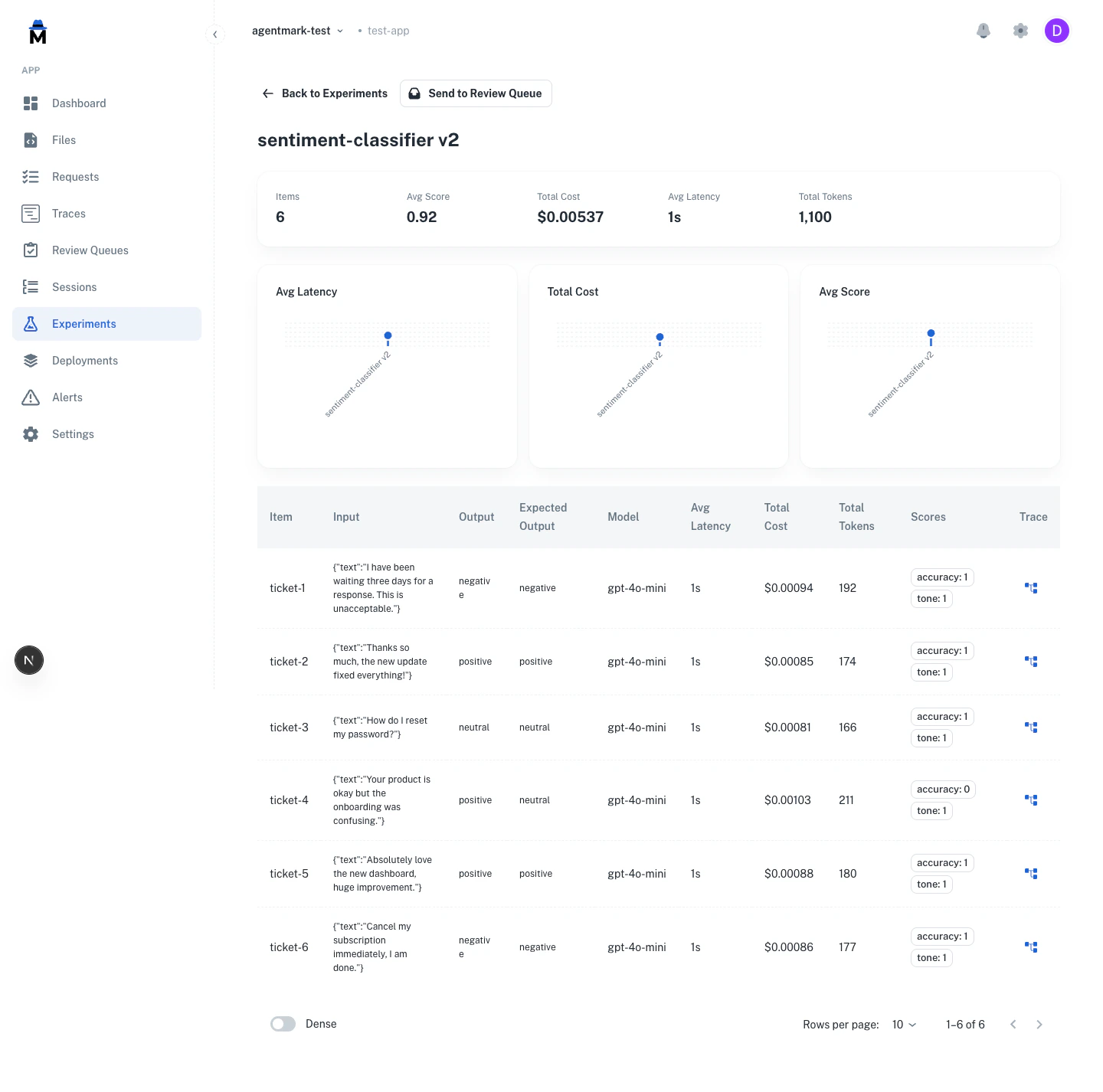 The experiment detail view lists each dataset row in a table with columns for **Item**, **Input**, **Output**, **Expected Output**, **Model**, latency, cost, tokens, **Scores**, and a **Trace** link. Above the table, aggregate metrics summarize the run (items, average score, total cost, average latency, total tokens) alongside charts.
Use **Send to Review Queue** on the detail page to send the experiment's items to an annotation queue for human review. See [Human annotation](/evaluate/annotations).
### Compare runs
Select 2 to 3 experiments in the list, then click **Compare** to view them side by side.
The experiment detail view lists each dataset row in a table with columns for **Item**, **Input**, **Output**, **Expected Output**, **Model**, latency, cost, tokens, **Scores**, and a **Trace** link. Above the table, aggregate metrics summarize the run (items, average score, total cost, average latency, total tokens) alongside charts.
Use **Send to Review Queue** on the detail page to send the experiment's items to an annotation queue for human review. See [Human annotation](/evaluate/annotations).
### Compare runs
Select 2 to 3 experiments in the list, then click **Compare** to view them side by side.
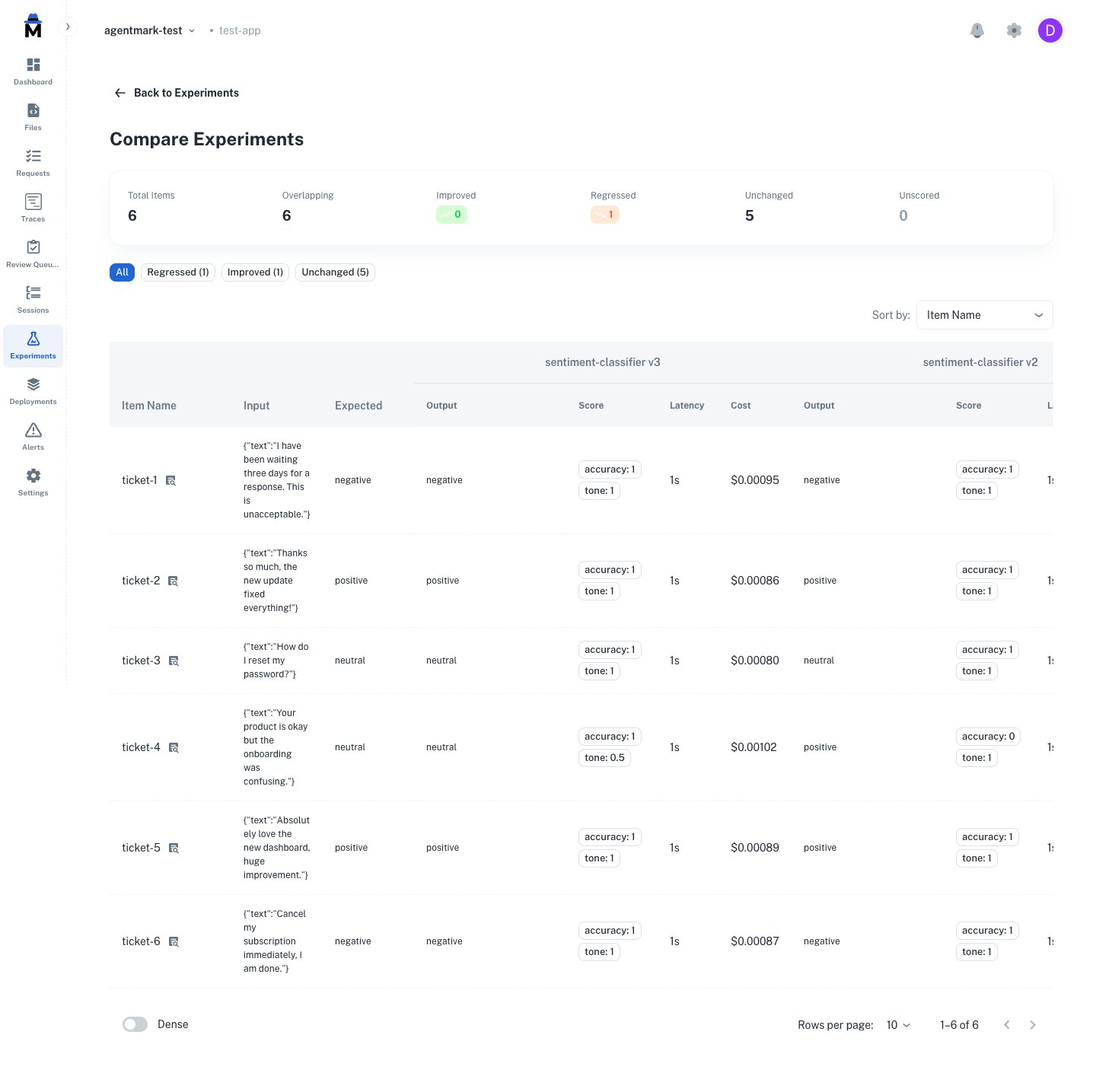 The comparison view places runs side by side (2 to 3) and tags each item as **Improved**, **Regressed**, or **Unchanged**, so you can see exactly which cases a prompt change fixed or broke.
The video shows `agentmark run-experiment` executing against a dataset: each row is processed, the AI output is scored, and a results table prints to stdout with pass/fail status per evaluator.
## CLI usage
### Quick start
```bash theme={null}
agentmark run-experiment agentmark/classifier.prompt.mdx
```
**Requirements**:
* Dataset configured in prompt frontmatter
* Development server running (`agentmark dev`)
* Optional: Evaluation functions defined
Keep `agentmark dev` running in a separate terminal. The `run-experiment` command talks to it on port 9417.
Each run is also browsable in the local dev server UI at `http://localhost:3000/experiments` (list, detail, and compare views).
### Full command signature
```bash theme={null}
agentmark run-experiment [options]
Options:
--server Webhook server URL (default: http://localhost:9417)
--skip-eval Skip running evals even if they exist
--format Output format: table, csv, json, jsonl, or junit (default: table)
--threshold Fail if pass percentage is below threshold (0-100)
--truncate Truncate long cells in table output (default 1000; 0 = unlimited)
--concurrency Dataset rows to run in parallel (default: 20)
--baseline-commit
The comparison view places runs side by side (2 to 3) and tags each item as **Improved**, **Regressed**, or **Unchanged**, so you can see exactly which cases a prompt change fixed or broke.
The video shows `agentmark run-experiment` executing against a dataset: each row is processed, the AI output is scored, and a results table prints to stdout with pass/fail status per evaluator.
## CLI usage
### Quick start
```bash theme={null}
agentmark run-experiment agentmark/classifier.prompt.mdx
```
**Requirements**:
* Dataset configured in prompt frontmatter
* Development server running (`agentmark dev`)
* Optional: Evaluation functions defined
Keep `agentmark dev` running in a separate terminal. The `run-experiment` command talks to it on port 9417.
Each run is also browsable in the local dev server UI at `http://localhost:3000/experiments` (list, detail, and compare views).
### Full command signature
```bash theme={null}
agentmark run-experiment [options]
Options:
--server Webhook server URL (default: http://localhost:9417)
--skip-eval Skip running evals even if they exist
--format Output format: table, csv, json, jsonl, or junit (default: table)
--threshold Fail if pass percentage is below threshold (0-100)
--truncate Truncate long cells in table output (default 1000; 0 = unlimited)
--concurrency Dataset rows to run in parallel (default: 20)
--baseline-commit [ Git ref (or tree hash) of a prior run to compare against; enables the
regression gate via test_settings.regression_tolerance (see /deploy/regression-gates)
Dataset sampling (pick at most one):
--sample Run on a random N% of rows (1-100)
--rows Select specific rows by index or range (e.g., 0,3-5,9)
--split Train/test split (e.g., train:80 or test:80)
--seed Seed for reproducible sampling/splitting
```
The `--server` flag defaults to the `AGENTMARK_WEBHOOK_URL` environment variable if set, otherwise `http://localhost:9417`.
`run-experiment` always executes prompts through a **webhook server** — `--server`, else `AGENTMARK_WEBHOOK_URL`, else `http://localhost:9417`. Locally that's `agentmark dev`; in CI you boot one (see [CI/CD](/deploy/ci-cd#run-evals-in-ci-raw-cli)) or point `--server` at a running webhook runner. `AGENTMARK_API_KEY` does **not** change where execution happens: it only controls where `--baseline-commit` reads the regression baseline from — AgentMark Cloud when the key is set (durable across CI runs), the local dev server's store otherwise.
### Command options
**Skip evaluations** (output-only mode):
```bash theme={null}
agentmark run-experiment agentmark/test.prompt.mdx --skip-eval
```
**Output format**:
```bash theme={null}
agentmark run-experiment agentmark/test.prompt.mdx --format table # Default
agentmark run-experiment agentmark/test.prompt.mdx --format csv # Spreadsheets
agentmark run-experiment agentmark/test.prompt.mdx --format json # Structured
agentmark run-experiment agentmark/test.prompt.mdx --format jsonl # Line-delimited
agentmark run-experiment agentmark/test.prompt.mdx --format junit # JUnit XML for CI gating
```
**Pass rate threshold** (CI/CD):
```bash theme={null}
agentmark run-experiment agentmark/test.prompt.mdx --threshold 85
```
Exits with non-zero code if pass rate falls below the threshold. Requires evaluations that return a `passed` field.
`--threshold` is an absolute pass-rate gate on a single run. To gate CI on per-case regressions against a baseline, where a PR fails when a case scores worse than it did before, see [Regression gates](/deploy/regression-gates).
**JUnit XML for CI gating**:
`--format junit` emits a [JUnit XML](https://github.com/testmoapp/junitxml) document that every major CI system already parses natively: GitHub Actions (via marketplace parsers), GitLab CI (via `artifacts.reports.junit`), Jenkins, CircleCI, and others. Each `(row × scorer)` pair becomes one ``; failing scorers emit `` with input/actual/expected payload in CDATA.
```bash theme={null}
agentmark run-experiment agentmark/test.prompt.mdx --format junit > results.xml
```
The XML can be combined with `--threshold` for a suite-level gate on top of the per-row failures already surfaced in the report.
Any CI system can run this today: install your project dependencies, boot the dev server headless (`agentmark dev --no-ui --no-forward`), wait for port 9417, run the command above, and point your CI's JUnit reporter at `results.xml`. For complete copy-paste jobs (GitHub Actions and GitLab CI), the packaged integrations, and API-key setup, see [CI/CD](/deploy/ci-cd). To gate per-case regressions from inside your own test suite instead, use the SDK setup in [Regression gates](/deploy/regression-gates).
**Dataset sampling** (see [Dataset sampling](#dataset-sampling) below):
```bash theme={null}
agentmark run-experiment agentmark/test.prompt.mdx --sample 20
agentmark run-experiment agentmark/test.prompt.mdx --rows 0,3-5,9
agentmark run-experiment agentmark/test.prompt.mdx --split train:80
```
**Custom server**:
```bash theme={null}
agentmark run-experiment agentmark/test.prompt.mdx --server http://staging:9417
```
### Dataset sampling
Run experiments on a subset of your dataset without modifying the dataset file. The three sampling modes are mutually exclusive, so use only one per run.
**Random sample** (`--sample `):
Run on a random N% of rows. Useful for quick smoke tests against large datasets.
```bash theme={null}
# Run on ~20% of rows (random, non-reproducible)
agentmark run-experiment agentmark/test.prompt.mdx --sample 20
# Reproducible: same 20% every time
agentmark run-experiment agentmark/test.prompt.mdx --sample 20 --seed 42
```
**Specific rows** (`--rows `):
Select individual rows by zero-based index. Supports comma-separated indices and ranges.
```bash theme={null}
# Row 0 only
agentmark run-experiment agentmark/test.prompt.mdx --rows 0
# Rows 0, 3, 4, 5, and 9
agentmark run-experiment agentmark/test.prompt.mdx --rows 0,3-5,9
```
**Train/test split** (`--split `):
Split the dataset into train and test portions. Run only the train portion or only the test portion.
```bash theme={null}
# Run on the first 80% (train portion), positional split
agentmark run-experiment agentmark/test.prompt.mdx --split train:80
# Run on the remaining 20% (test portion), positional split
agentmark run-experiment agentmark/test.prompt.mdx --split test:80
# Seeded split — random assignment, reproducible across runs
agentmark run-experiment agentmark/test.prompt.mdx --split train:80 --seed 42
agentmark run-experiment agentmark/test.prompt.mdx --split test:80 --seed 42
```
Without `--seed`, `--split` uses positional assignment: the first N% of rows are "train" and the rest are "test". With `--seed`, each row is assigned to train or test by a deterministic hash, so the order in the file does not matter.
**Reproducibility with `--seed`**:
The `--seed` flag guarantees the same rows are selected every time, across TypeScript and Python. Pass the same seed to get identical results on any machine or language runtime.
```bash theme={null}
# These two runs always process the exact same rows
agentmark run-experiment agentmark/test.prompt.mdx --sample 30 --seed 99
agentmark run-experiment agentmark/test.prompt.mdx --sample 30 --seed 99
```
Use `--seed` in CI/CD pipelines to prevent flaky results from random row selection.
### Output example
| # | Input | AI Result | Expected Output | sentiment\_check |
| - | ---------------------- | --------- | --------------- | ---------------- |
| 1 | `{"text":"I love it"}` | positive | positive | PASS (1.00) |
| 2 | `{"text":"Terrible"}` | negative | negative | PASS (1.00) |
| 3 | `{"text":"It's okay"}` | neutral | neutral | PASS (1.00) |
On a normal run the table (or `--format` output) is the only result. Pass `--threshold <0-100>` to also print a pass-rate summary and gate the exit code. The pass rate is counted over **evaluations** (row × evaluator pairs), not rows:
```text theme={null}
✅ Experiment passed threshold check
Pass rate: 100% (3/3 evaluations passed)
Threshold: 85%
```
If the pass rate falls below the threshold, the CLI prints `❌ Experiment failed threshold check` and exits non-zero. Wire that into CI for regression gating.
The CLI supports both `.mdx` source files and pre-built `.json` files (from `agentmark build`). Media outputs (images, audio) are saved to `.agentmark-outputs/` with clickable file paths.
## How it works
The `run-experiment` command:
1. Loads your prompt file (`.mdx` or pre-built `.json`) and parses the frontmatter
2. Reads the dataset specified in `test_settings.dataset`
3. Sends the prompt and dataset to the dev server (default: `http://localhost:9417`)
4. The server runs the prompt against each dataset row
5. Evaluates results using the evals specified in `test_settings.evals`
6. Streams results back to the CLI as they complete
7. Displays formatted output (table, CSV, JSON, JSONL, or JUnit XML)
## Configuration
Link dataset and evals in prompt frontmatter:
```mdx theme={null}
---
name: sentiment-classifier
test_settings:
dataset: ./datasets/sentiment.jsonl
evals:
- sentiment_check
---
Classify the sentiment
{props.text}
```
The frontmatter also accepts `test_settings.props`:
```yaml theme={null}
test_settings:
props:
language: en
verbose: false
dataset: ./datasets/sentiment.jsonl
evals:
- sentiment_check
```
`test_settings.props` only feeds the test rendering used by `run-prompt`. Experiments ignore it: each dataset row's `input` is passed to the template as the complete set of props, with no merge against `test_settings.props`. If a row omits a variable the template references, that row fails with `Variable "" is not defined in the scope.`, so every dataset row must carry complete inputs.
**Dataset (sentiment.jsonl)**:
```jsonl theme={null}
{"input": {"text": "I love this!"}, "expected_output": "positive"}
{"input": {"text": "Terrible product"}, "expected_output": "negative"}
{"input": {"text": "It's okay"}, "expected_output": "neutral"}
```
[Learn more about datasets →](/evaluate/datasets)
[Learn more about evals →](/evaluate/writing-evals)
## Workflow
**1. Develop prompts** - Iterate on your prompt design
**2. Create datasets** - Add test cases covering your scenarios
**3. Write evaluations** - Define success criteria
**4. Run experiments** - Test against dataset
```bash theme={null}
agentmark run-experiment agentmark/my-prompt.prompt.mdx
```
**5. Review results** - Identify failures and patterns
**6. Iterate** - Fix issues, improve prompts, add test cases
**7. Deploy with confidence** - Pass rate meets your threshold
## SDK usage
Run experiments programmatically using `formatWithDataset()`:
```typescript theme={null}
import { client } from './agentmark.client';
import { generateText } from 'ai'; // Or your SDK's generation function
const prompt = await client.loadTextPrompt('classifier.prompt.mdx');
// Returns a stream of formatted inputs from the dataset
const datasetStream = await prompt.formatWithDataset();
// Process each test case
for await (const item of datasetStream) {
// The stream can yield error chunks ({ error, type: 'error' }) — handle them first
if (item.type === 'error') {
console.error(`Dataset error: ${item.error}`);
continue;
}
const { dataset, formatted, evals } = item;
// Run the prompt with your AI SDK
const result = await generateText(formatted);
// Check results
const passed = result.text === dataset.expected_output;
console.log(`Input: ${JSON.stringify(dataset.input)}`);
console.log(`Expected: ${dataset.expected_output}`);
console.log(`Got: ${result.text}`);
console.log(`Result: ${passed ? 'PASS' : 'FAIL'}\n`);
}
```
The stream returns objects with:
* `dataset` - The test case (`input` and `expected_output`)
* `formatted` - The formatted prompt ready for your AI SDK
* `evals` - List of evaluation names to run
* `type` - Always `"dataset"`
**Options** (`FormatWithDatasetOptions`):
* `datasetPath?: string` - Override dataset from frontmatter
* `format?: 'ndjson' | 'json'` - Buffer all rows (`'json'`) or stream as available (`'ndjson'`, default)
* `sampling?: SamplingOptions` - Run on a subset of dataset rows. Mirrors the CLI `--sample`/`--rows`/`--split`/`--seed` flags: `{ sample?: number; rows?: number[]; split?: { portion: 'train' | 'test'; percentage: number }; seed?: number }` (the three modes are mutually exclusive)
**When to use**:
* Custom test logic in your test framework
* Fine-grained control over test execution
* Integrating with existing test infrastructure
* Running experiments in application code
## Troubleshooting
### CLI issues
**Dataset not found**:
* Check dataset path in frontmatter
* Verify file exists and is valid JSONL
**Server connection error**:
* Ensure `agentmark dev` is running
* Check ports are available (default webhook port: 9417)
* Verify `--server` URL if using a custom server
**Invalid dataset format**:
* Each line must be valid JSON
* Required: `input` field
* Optional: `expected_output` field
**No evaluations ran**:
* Add `evals` to `test_settings` in frontmatter
* Or use `--skip-eval` flag for output-only mode
**Threshold check failed**:
* The `--threshold` flag requires evals that return a `passed` field
* Verify your eval functions return `{ passed: true/false, ... }`
**Sampling options conflict**:
* Only one of `--sample`, `--rows`, or `--split` may be used at a time
* `--seed` can be combined with any of them
## Programmatic access
You can query experiment results, run traces, and prompt file listings through the [REST API](/api-reference/overview), or from an IDE agent via the [`agentmark-mcp`](/coding-agents/gateway-mcp) MCP server. Use either to build custom reporting, export results to external tools, or integrate experiment data into CI/CD pipelines.
```bash theme={null}
# List experiments
curl "http://localhost:9418/v1/experiments?limit=10"
# Get a specific experiment, including its runs and evaluation results
curl "http://localhost:9418/v1/experiments/"
# List traces for a specific experiment run — filter `/v1/traces` by `dataset_run_id`
curl "http://localhost:9418/v1/traces?dataset_run_id="
# List prompt files registered with the local dev server
curl "http://localhost:9418/v1/prompts?limit=10"
```
```bash theme={null}
# Same call against AgentMark Cloud — set auth + app headers
curl "https://api.agentmark.co/v1/experiments?limit=10" \
-H "Authorization: Bearer $AGENTMARK_API_KEY" \
-H "X-Agentmark-App-Id: $AGENTMARK_APP_ID"
```
`experiments` ships on Cloud + Local. `prompts` is Local-only today; Cloud returns `501 not_available_on_cloud`. Use `/v1/traces?dataset_run_id=…` to list traces for a run. Call [`GET /v1/capabilities`](/api-reference/overview) to check which features a server supports at runtime.
]
## Next steps
Create test datasets
Write evaluation functions
Learn testing concepts
Have questions?
Reach out any time: