> ## Documentation Index
> Fetch the complete documentation index at: https://docs.agentmark.co/llms.txt
> Use this file to discover all available pages before exploring further.
# Evaluations
> Write evaluation functions to score prompt outputs
Evaluations (evals) are functions that score prompt outputs and return pass or fail. Each eval has two parts: a score config in `agentmark.json` that declares what it measures (boolean, numeric, or categorical), and a function in code that produces the score. AgentMark binds the two when the config key and the function key share the same name. In Cloud, score configs sync to the Dashboard and you pick evals to run from the New Experiment dialog. In Local, you register eval functions in your client and run them through the CLI.
**Start with evals first** - Build your evaluation framework before writing prompts. Evals give you a way to measure what works and iterate on it.
## Evals in the Dashboard
Cloud evals come from two pieces that you maintain in your repo:
* **Score configs** declared in `agentmark.json` under `scores`. These define what each eval scores on (boolean, numeric, or categorical).
* **Eval functions**, dispatched to the eval worker through the gateway's `/v1/evals` routes. These run during experiments and produce the scores.
### Declare score configs
Add a `scores` block to `agentmark.json`. Each key is an eval name that your eval functions return scores for.
```json agentmark.json theme={null}
{
"scores": {
"accuracy": {
"type": "boolean",
"description": "Was the response factually correct?"
},
"tone": {
"type": "categorical",
"description": "Response tone classification",
"categories": [
{ "label": "professional", "value": 1 },
{ "label": "casual", "value": 0.5 },
{ "label": "inappropriate", "value": 0 }
]
}
}
}
```
Push to your connected branch so the deployment pipeline syncs the score configs to AgentMark Cloud. Once synced, they stay available in the Dashboard across deployments. See [Project configuration](/configure/project-config) for the full `scores` schema, and the **Local** tab for writing the eval functions themselves.
### Pick evals when you run an experiment
In the New Experiment dialog, the **Evaluations** field is a multi-select populated from the evals your deployed handler registers. Selecting a prompt auto-fills the evaluations from its `test_settings` frontmatter.
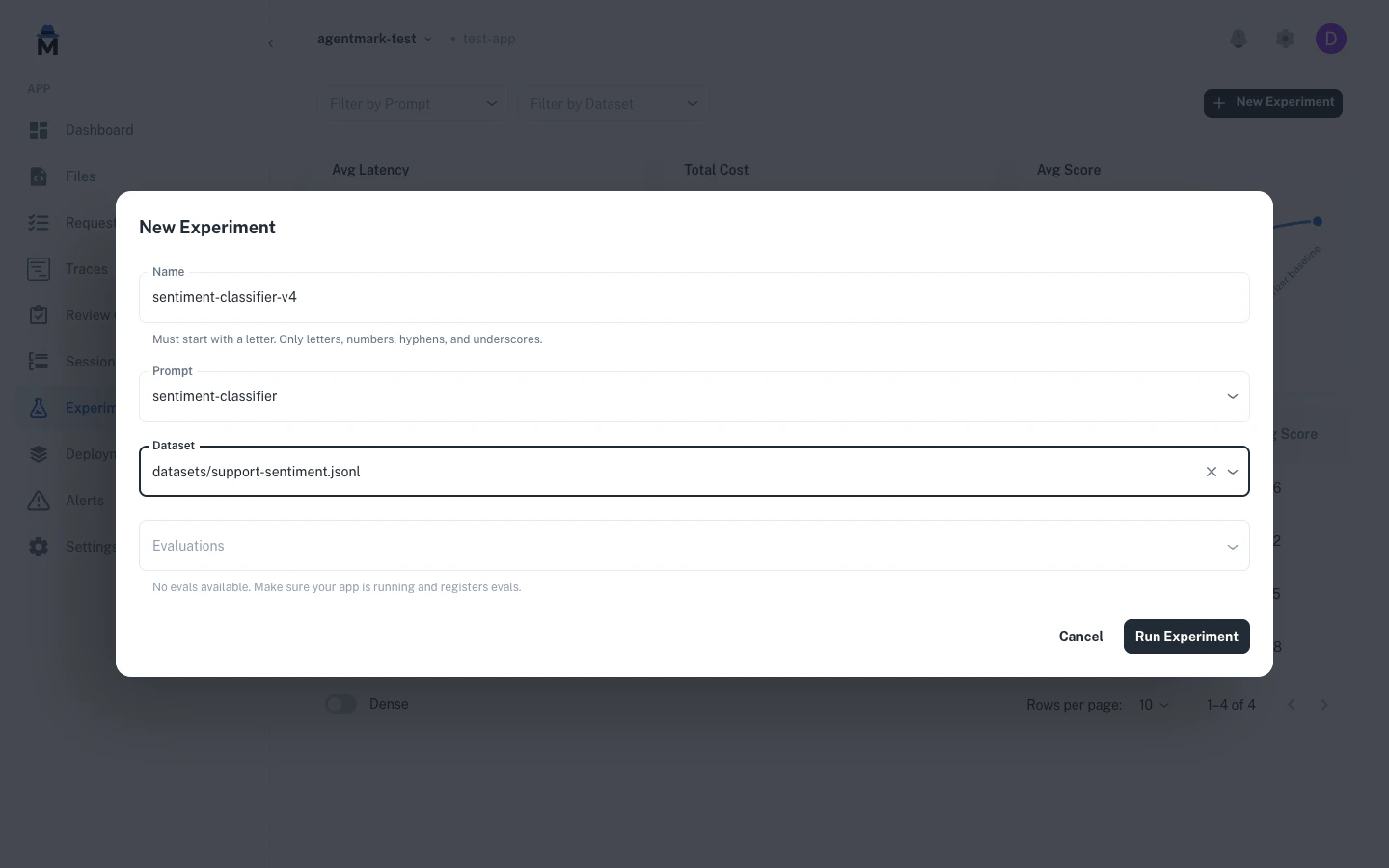 The New Experiment dialog includes an **Evaluations** multi-select. Options come from the evals your deployed handler registers.
### See results as scores
Eval results appear as per-row scores and run-level aggregates in the experiment detail view.
The New Experiment dialog includes an **Evaluations** multi-select. Options come from the evals your deployed handler registers.
### See results as scores
Eval results appear as per-row scores and run-level aggregates in the experiment detail view.
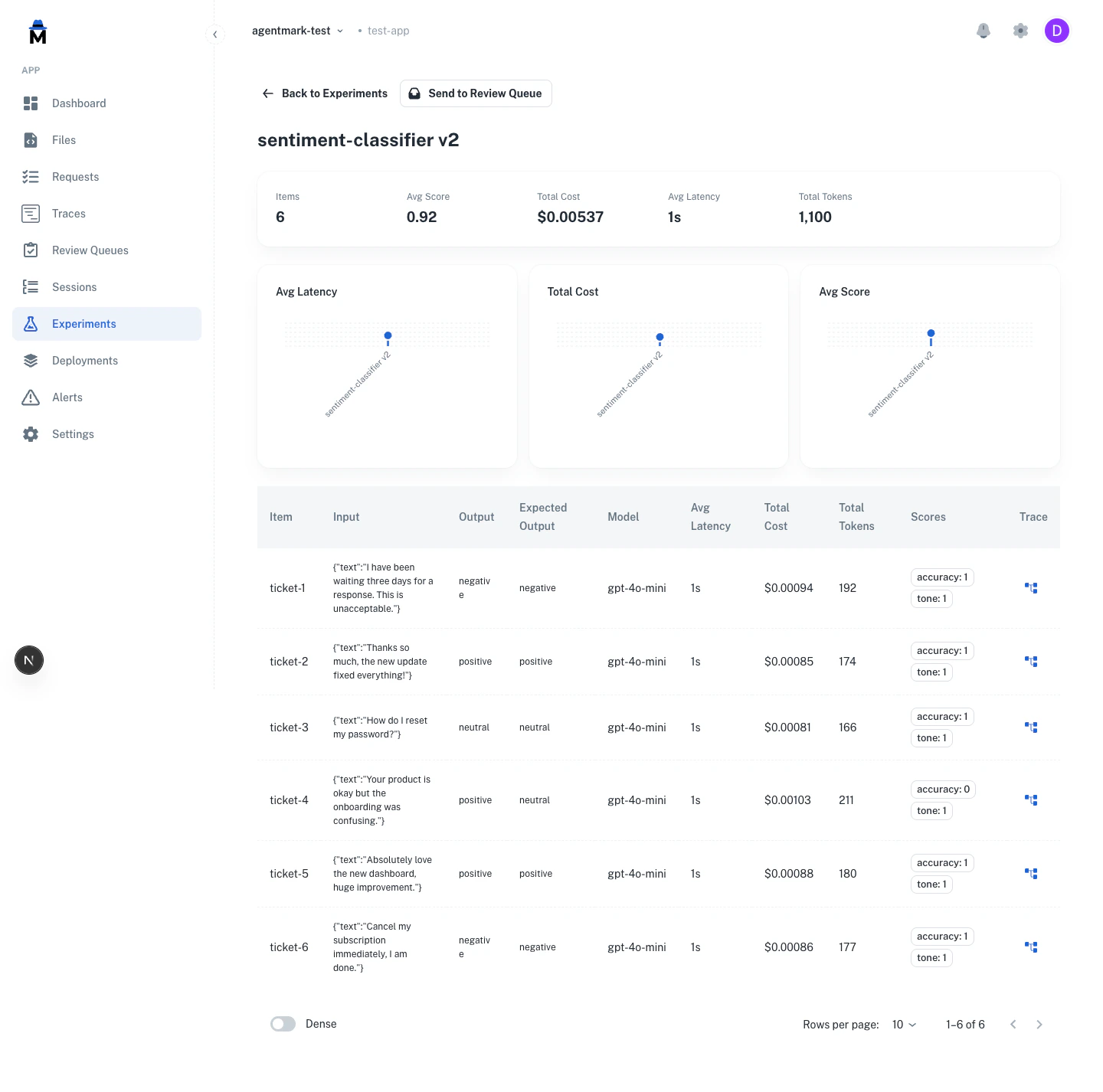 The experiment detail view lists each dataset row with its evaluator scores, plus aggregate metrics for the run such as average score. See [Running experiments](/evaluate/running-experiments) for the full detail view.
The same score configs power human annotation. Reviewers score traces against the configs you declare in `agentmark.json`. See [Human annotation](/evaluate/annotations).
## Quick start
**1. Define score schemas** in `agentmark.json`:
```json agentmark.json theme={null}
{
"scores": {
"accuracy": {
"type": "boolean",
"description": "Was the response factually correct?"
}
}
}
```
**2. Create an eval function** that returns `{passed, score, reason}`:
```typescript theme={null}
export const accuracy = async ({ output, expectedOutput, input }) => {
const match = output.trim() === (expectedOutput ?? '').trim();
return {
passed: match,
score: match ? 1.0 : 0.0,
reason: match ? undefined : `Expected "${expectedOutput}", got "${output}"`
};
};
```
```python theme={null}
from agentmark.prompt_core import EvalParams, EvalResult
def accuracy(params: EvalParams) -> EvalResult:
output = str(params["output"]).strip()
expected = str(params.get("expectedOutput", "")).strip()
match = output == expected
return {
"passed": match,
"score": 1.0 if match else 0.0,
"reason": None if match else f'Expected "{expected}", got "{output}"'
}
```
**3. Register the eval on your client** so the runner can find it by name: `createAgentMark({ loader, scorers: { accuracy } })` (Python: `create_agentmark(loader=loader, scorers={"accuracy": accuracy})`). See [Registering evals](#registering-evals) below.
**4. Reference in your prompt's frontmatter:**
```mdx theme={null}
---
name: sentiment-classifier
test_settings:
dataset: ./datasets/sentiment.jsonl
evals:
- accuracy
---
```
## Writing eval functions
Eval functions are plain functions that score prompt outputs. Score schemas are defined separately in `agentmark.json`, and the two are connected by name.
```typescript theme={null}
const scorers = {
accuracy: async ({ output, expectedOutput }) => {
const match = output.trim() === expectedOutput?.trim();
return { passed: match, score: match ? 1 : 0 };
},
tone: async ({ output }) => {
const isProfessional = !output.includes("lol") && !output.includes("!!!");
return {
passed: isProfessional,
label: isProfessional ? "professional" : "casual",
};
},
};
```
```python theme={null}
from agentmark.prompt_core import EvalParams, EvalResult
scorers = {
"accuracy": lambda params: {
"passed": str(params["output"]).strip() == str(params.get("expectedOutput", "")).strip(),
"score": 1.0 if str(params["output"]).strip() == str(params.get("expectedOutput", "")).strip() else 0.0,
},
"tone": lambda params: {
"passed": "lol" not in str(params["output"]) and "!!!" not in str(params["output"]),
"label": "professional" if ("lol" not in str(params["output"]) and "!!!" not in str(params["output"])) else "casual",
},
}
```
Define the corresponding score schemas in `agentmark.json` so they are available in the Dashboard:
```json agentmark.json theme={null}
{
"scores": {
"accuracy": {
"type": "boolean",
"description": "Was the response factually correct?"
},
"tone": {
"type": "categorical",
"description": "Response tone classification",
"categories": [
{ "label": "professional", "value": 1 },
{ "label": "casual", "value": 0.5 },
{ "label": "inappropriate", "value": 0 }
]
}
}
}
```
Score schemas defined in `agentmark.json` remain available in the Dashboard across experiment runs.
## Function signature
```typescript theme={null}
interface EvalParams {
input: string | Record | Array | string>;
output: string | Record | Array | string>;
expectedOutput?: string; // Maps from dataset's expected_output field
metadata?: Record | null;
}
interface EvalResult {
score?: number; // Numeric score (0-1 recommended)
passed?: boolean; // Pass/fail status (used by --threshold)
label?: string; // Classification label for categorization
reason?: string; // Explanation for the result
}
type EvalFunction = (params: EvalParams) => Promise | EvalResult;
```
```python theme={null}
from typing import Any, TypedDict, Callable, Awaitable
class EvalParams(TypedDict, total=False):
input: str | dict[str, Any] | list[dict[str, Any] | str]
output: str | dict[str, Any] | list[dict[str, Any] | str]
expectedOutput: str | None # Note: camelCase in Python
metadata: dict[str, Any] | None
class EvalResult(TypedDict, total=False):
passed: bool # Pass/fail status
score: float # Numeric score (0-1)
reason: str # Explanation for failure
label: str # Custom label for categorization
# Both sync and async functions are supported
EvalFunction = Callable[[EvalParams], EvalResult | Awaitable[EvalResult]]
```
## Registering evals
Eval **functions** register on the client (or, for in-process experiment runs, on the call itself):
* **Cloud execution** (Dashboard Run, managed experiments): register them on [`createAgentMark`](/getting-started/client-setup), the client you hand to `createWebhookRunner`. The runner sources them from the client, so they both run in experiments and list in the New Experiment dialog.
* **In your own app**: pass them as `evaluators` to [`sdk.runExperiment`](/build/running-prompts).
Register the eval map on the client, then build the runner that AgentMark Cloud dispatches to from it. See [Connect your SDK](/getting-started/client-setup#connect-your-sdk) for the `executor` that wraps your SDK.
```typescript TypeScript theme={null}
import { createAgentMark } from "@agentmark-ai/prompt-core";
import { createWebhookRunner } from "@agentmark-ai/sdk";
const client = createAgentMark({
loader,
scorers: {
accuracy: accuracyFn,
contains_keyword: containsKeywordFn,
},
});
const runner = createWebhookRunner({ client, executor });
export default (body) => runner.dispatch(body);
```
```python Python theme={null}
from agentmark.prompt_core import create_agentmark, create_webhook_runner
client = create_agentmark(
loader=loader,
scorers={
"accuracy": accuracy,
"contains_keyword": contains_keyword,
},
)
runner = create_webhook_runner(client, executor)
handler = runner.dispatch
```
Pass the same functions as `evaluators` to `runExperiment`. Each evaluator takes `{ output, expectedOutput }` and returns a score.
```typescript theme={null}
const result = await sdk.runExperiment({
experimentKey: "support-quality",
dataset,
task: async (input) => {
const { messages, text_config } = await (
await client.loadTextPrompt("support.prompt.mdx")
).format({ props: input });
const { text } = await generateText({
model: openai(text_config.model_name.replace(/^openai\//, "")),
messages,
});
return text;
},
evaluators: [
{ name: "accuracy", evaluate: accuracyFn },
{ name: "contains_keyword", evaluate: containsKeywordFn },
],
});
```
### Eval function registry
Eval functions are plain functions mapped by name. In TypeScript, use `Record`. In Python, use `dict[str, EvalFunction]`. Score schemas are defined separately in `agentmark.json` and deployed to AgentMark Cloud. The eval functions run during experiments and are connected to scores by name.
```typescript theme={null}
import type { EvalFunction } from "@agentmark-ai/prompt-core";
const scorers: Record = {
accuracy: accuracyFn,
relevance: relevanceFn,
};
// Standard object operations
scorers["new_eval"] = newEvalFn;
const fn = scorers["accuracy"];
const exists = "accuracy" in scorers;
delete scorers["accuracy"];
const names = Object.keys(scorers);
```
```python theme={null}
from agentmark.prompt_core import EvalFunction
scorers: dict[str, EvalFunction] = {
"accuracy": accuracy_fn,
"relevance": relevance_fn,
}
# Standard dict operations
scorers["new_eval"] = new_eval_fn
fn = scorers["accuracy"]
exists = "accuracy" in scorers
del scorers["accuracy"]
names = list(scorers.keys())
```
All fields in `EvalResult` are optional. Return whichever fields are relevant to your eval. The `passed` field is used by the CLI `--threshold` flag to calculate pass rates.
## Evaluation types
### Reference-based (ground truth)
Compare outputs against known correct answers:
```typescript theme={null}
export const exact_match = async ({ output, expectedOutput }) => {
return {
passed: output === expectedOutput,
score: output === expectedOutput ? 1 : 0
};
};
```
**Use for:** Classification, extraction, math problems, multiple choice
### Reference-free (heuristic)
Check structural requirements without ground truth:
```typescript theme={null}
export const has_required_fields = async ({ output }) => {
const required = ['name', 'email', 'summary'];
const hasAll = required.every(field => output[field]);
return {
passed: hasAll,
score: hasAll ? 1 : 0,
reason: hasAll ? undefined : 'Missing required fields'
};
};
```
**Use for:** Format validation, length checks, required content
### Model-graded (LLM-as-judge)
Use an LLM to evaluate subjective criteria:
```typescript theme={null}
import { generateObject } from 'ai';
import { openai } from '@ai-sdk/openai';
import { z } from 'zod';
export const tone_eval = async ({ output, expectedOutput }) => {
const { object } = await generateObject({
model: openai('gpt-5-mini'),
schema: z.object({ passed: z.boolean(), reasoning: z.string() }),
prompt: `Evaluate if this response has appropriate ${expectedOutput} tone:\n\n${output}`,
temperature: 0.1,
});
return {
passed: object.passed,
score: object.passed ? 1 : 0,
reason: object.reasoning,
};
};
```
**Use for:** Tone, creativity, helpfulness, semantic similarity
**Combine approaches** - Use reference-based for correctness, reference-free for structure, and model-graded for subjective quality.
## Common patterns
### Classification
```typescript theme={null}
export const classification_accuracy = async ({ output, expectedOutput }) => {
const match = output.trim().toLowerCase() === expectedOutput.trim().toLowerCase();
return {
passed: match,
score: match ? 1 : 0,
reason: match ? undefined : `Expected ${expectedOutput}, got ${output}`
};
};
```
```python theme={null}
def classification_accuracy(params: EvalParams) -> EvalResult:
output = str(params["output"]).strip().lower()
expected = str(params["expectedOutput"]).strip().lower()
match = output == expected
return {
"passed": match,
"score": 1.0 if match else 0.0,
"reason": None if match else f"Expected {expected}, got {output}"
}
```
### Contains keyword
```typescript theme={null}
export const contains_keyword = async ({ output, expectedOutput }) => {
const contains = output.includes(expectedOutput);
return {
passed: contains,
score: contains ? 1 : 0,
reason: contains ? undefined : `Output missing "${expectedOutput}"`
};
};
```
```python theme={null}
def contains_keyword(params: EvalParams) -> EvalResult:
output = str(params["output"])
expected = str(params["expectedOutput"])
contains = expected in output
return {
"passed": contains,
"score": 1.0 if contains else 0.0,
"reason": None if contains else f'Output missing "{expected}"'
}
```
### Field presence
```typescript theme={null}
export const required_fields = async ({ output }) => {
const required = ['name', 'email', 'message'];
const missing = required.filter(field => !(field in output));
return {
passed: missing.length === 0,
score: (required.length - missing.length) / required.length,
reason: missing.length > 0 ? `Missing: ${missing.join(', ')}` : undefined
};
};
```
### Length check
```typescript theme={null}
export const length_check = async ({ output }) => {
const length = output.length;
const passed = length >= 10 && length <= 500;
return {
passed,
score: passed ? 1 : 0,
reason: passed ? undefined : `Length ${length} outside range [10, 500]`
};
};
```
### Format validation
```typescript theme={null}
export const email_format = async ({ output }) => {
const emailRegex = /^[^\s@]+@[^\s@]+\.[^\s@]+$/;
const passed = emailRegex.test(output);
return {
passed,
score: passed ? 1 : 0,
reason: passed ? undefined : 'Invalid email format'
};
};
```
### Graduated scoring
Use `label` field to categorize results:
```typescript theme={null}
export const sentiment_gradual = async ({ output, expectedOutput }) => {
if (output === expectedOutput) {
return { passed: true, score: 1.0, label: 'exact_match' };
}
const partialMatches = {
'positive': ['very positive', 'somewhat positive'],
'negative': ['very negative', 'somewhat negative']
};
if (partialMatches[expectedOutput]?.includes(output)) {
return {
passed: true,
score: 0.7,
label: 'partial_match',
reason: 'Close semantic match'
};
}
return {
passed: false,
score: 0,
label: 'no_match',
reason: `Expected ${expectedOutput}, got ${output}`
};
};
```
Filter by label (`exact_match`, `partial_match`, `no_match`) to understand patterns.
## LLM-as-judge
### Using AgentMark prompts
Defining the judge as an AgentMark prompt is the recommended approach.
**1. Create eval prompt** (`agentmark/evals/tone-judge.prompt.mdx`):
```mdx theme={null}
---
name: tone-judge
object_config:
model_name: openai/gpt-5-mini
temperature: 0.1
schema:
type: object
properties:
passed:
type: boolean
reasoning:
type: string
---
You are evaluating whether an AI response has appropriate professional tone.
First explain your reasoning step-by-step, then provide your final judgment.
**Output to evaluate:**
{props.output}
**Expected tone:**
{props.expectedOutput}
```
**2. Use in eval function**:
```typescript theme={null}
import { client } from './agentmark.client';
import { generateObject, jsonSchema } from 'ai';
import { openai } from '@ai-sdk/openai';
export const tone_check = async ({ output, expectedOutput }) => {
const evalPrompt = await client.loadObjectPrompt('evals/tone-judge.prompt.mdx');
const { messages, object_config } = await evalPrompt.format({
props: { output, expectedOutput }
});
const { object } = await generateObject({
model: openai(object_config.model_name.replace(/^openai\//, "")),
messages,
schema: jsonSchema(object_config.schema),
});
return {
passed: object.passed,
score: object.passed ? 1 : 0,
reason: object.reasoning,
};
};
```
This lets you version control eval logic, iterate independently, reuse prompts, and use templating.
### LLM-as-judge best practices
**Configuration**:
* Use low temperature (0.1-0.3) for consistency
* Ask for reasoning before judgment (chain-of-thought)
* Use binary scoring (PASS/FAIL) not scales (1-10)
* Test one dimension at a time
**Model selection**:
* Use a stronger model to grade weaker ones (for example, GPT-5.1 grading GPT-5-mini outputs)
* Avoid grading a model with itself
* Validate with human evaluation before scaling
**Usage**:
* Use sparingly - slower and more expensive
* Reserve for subjective criteria
* Watch for position bias, verbosity bias, self-enhancement bias
**Avoid exact-match for open-ended outputs** - Use only for classification or short outputs. For longer text, use semantic similarity or LLM-based evaluation.
## Domain-specific evals
### RAG (retrieval-augmented generation)
`extractClaims` and `isSupported` are placeholders you implement for your domain. These examples are templates, not runnable code.
```typescript theme={null}
export const faithfulness = async ({ output, input }) => {
const context = input.retrieved_context;
const claims = extractClaims(output);
const supported = claims.every(claim => isSupported(claim, context));
return {
passed: supported,
score: supported ? 1 : 0,
reason: supported ? undefined : 'Output contains unsupported claims'
};
};
export const answer_relevancy = async ({ output, input }) => {
const isRelevant = output.toLowerCase().includes(input.query.toLowerCase());
return {
passed: isRelevant,
score: isRelevant ? 1 : 0,
reason: isRelevant ? undefined : 'Answer not relevant to query'
};
};
```
### Agent / tool calling
```typescript theme={null}
export const tool_correctness = async ({ output, expectedOutput }) => {
const correctTool = output.tool === expectedOutput.tool;
const correctParams = JSON.stringify(output.parameters) ===
JSON.stringify(expectedOutput.parameters);
return {
passed: correctTool && correctParams,
score: correctTool && correctParams ? 1 : 0.5,
reason: !correctTool ? 'Wrong tool selected' :
!correctParams ? 'Incorrect parameters' : undefined
};
};
```
## Best practices
* Test one thing per eval - separate functions for different criteria
* Provide helpful failure reasons for debugging
* Use meaningful names (`sentiment_accuracy` not `eval1`)
* Keep scores in 0-1 range
* Make evals deterministic and consistent (avoid flaky tests)
* Validate general behavior, not specific outputs (avoid overfitting)
## Next steps
Create test datasets
Run your evaluations
Learn testing concepts
The experiment detail view lists each dataset row with its evaluator scores, plus aggregate metrics for the run such as average score. See [Running experiments](/evaluate/running-experiments) for the full detail view.
The same score configs power human annotation. Reviewers score traces against the configs you declare in `agentmark.json`. See [Human annotation](/evaluate/annotations).
## Quick start
**1. Define score schemas** in `agentmark.json`:
```json agentmark.json theme={null}
{
"scores": {
"accuracy": {
"type": "boolean",
"description": "Was the response factually correct?"
}
}
}
```
**2. Create an eval function** that returns `{passed, score, reason}`:
```typescript theme={null}
export const accuracy = async ({ output, expectedOutput, input }) => {
const match = output.trim() === (expectedOutput ?? '').trim();
return {
passed: match,
score: match ? 1.0 : 0.0,
reason: match ? undefined : `Expected "${expectedOutput}", got "${output}"`
};
};
```
```python theme={null}
from agentmark.prompt_core import EvalParams, EvalResult
def accuracy(params: EvalParams) -> EvalResult:
output = str(params["output"]).strip()
expected = str(params.get("expectedOutput", "")).strip()
match = output == expected
return {
"passed": match,
"score": 1.0 if match else 0.0,
"reason": None if match else f'Expected "{expected}", got "{output}"'
}
```
**3. Register the eval on your client** so the runner can find it by name: `createAgentMark({ loader, scorers: { accuracy } })` (Python: `create_agentmark(loader=loader, scorers={"accuracy": accuracy})`). See [Registering evals](#registering-evals) below.
**4. Reference in your prompt's frontmatter:**
```mdx theme={null}
---
name: sentiment-classifier
test_settings:
dataset: ./datasets/sentiment.jsonl
evals:
- accuracy
---
```
## Writing eval functions
Eval functions are plain functions that score prompt outputs. Score schemas are defined separately in `agentmark.json`, and the two are connected by name.
```typescript theme={null}
const scorers = {
accuracy: async ({ output, expectedOutput }) => {
const match = output.trim() === expectedOutput?.trim();
return { passed: match, score: match ? 1 : 0 };
},
tone: async ({ output }) => {
const isProfessional = !output.includes("lol") && !output.includes("!!!");
return {
passed: isProfessional,
label: isProfessional ? "professional" : "casual",
};
},
};
```
```python theme={null}
from agentmark.prompt_core import EvalParams, EvalResult
scorers = {
"accuracy": lambda params: {
"passed": str(params["output"]).strip() == str(params.get("expectedOutput", "")).strip(),
"score": 1.0 if str(params["output"]).strip() == str(params.get("expectedOutput", "")).strip() else 0.0,
},
"tone": lambda params: {
"passed": "lol" not in str(params["output"]) and "!!!" not in str(params["output"]),
"label": "professional" if ("lol" not in str(params["output"]) and "!!!" not in str(params["output"])) else "casual",
},
}
```
Define the corresponding score schemas in `agentmark.json` so they are available in the Dashboard:
```json agentmark.json theme={null}
{
"scores": {
"accuracy": {
"type": "boolean",
"description": "Was the response factually correct?"
},
"tone": {
"type": "categorical",
"description": "Response tone classification",
"categories": [
{ "label": "professional", "value": 1 },
{ "label": "casual", "value": 0.5 },
{ "label": "inappropriate", "value": 0 }
]
}
}
}
```
Score schemas defined in `agentmark.json` remain available in the Dashboard across experiment runs.
## Function signature
```typescript theme={null}
interface EvalParams {
input: string | Record | Array | string>;
output: string | Record | Array | string>;
expectedOutput?: string; // Maps from dataset's expected_output field
metadata?: Record | null;
}
interface EvalResult {
score?: number; // Numeric score (0-1 recommended)
passed?: boolean; // Pass/fail status (used by --threshold)
label?: string; // Classification label for categorization
reason?: string; // Explanation for the result
}
type EvalFunction = (params: EvalParams) => Promise | EvalResult;
```
```python theme={null}
from typing import Any, TypedDict, Callable, Awaitable
class EvalParams(TypedDict, total=False):
input: str | dict[str, Any] | list[dict[str, Any] | str]
output: str | dict[str, Any] | list[dict[str, Any] | str]
expectedOutput: str | None # Note: camelCase in Python
metadata: dict[str, Any] | None
class EvalResult(TypedDict, total=False):
passed: bool # Pass/fail status
score: float # Numeric score (0-1)
reason: str # Explanation for failure
label: str # Custom label for categorization
# Both sync and async functions are supported
EvalFunction = Callable[[EvalParams], EvalResult | Awaitable[EvalResult]]
```
## Registering evals
Eval **functions** register on the client (or, for in-process experiment runs, on the call itself):
* **Cloud execution** (Dashboard Run, managed experiments): register them on [`createAgentMark`](/getting-started/client-setup), the client you hand to `createWebhookRunner`. The runner sources them from the client, so they both run in experiments and list in the New Experiment dialog.
* **In your own app**: pass them as `evaluators` to [`sdk.runExperiment`](/build/running-prompts).
Register the eval map on the client, then build the runner that AgentMark Cloud dispatches to from it. See [Connect your SDK](/getting-started/client-setup#connect-your-sdk) for the `executor` that wraps your SDK.
```typescript TypeScript theme={null}
import { createAgentMark } from "@agentmark-ai/prompt-core";
import { createWebhookRunner } from "@agentmark-ai/sdk";
const client = createAgentMark({
loader,
scorers: {
accuracy: accuracyFn,
contains_keyword: containsKeywordFn,
},
});
const runner = createWebhookRunner({ client, executor });
export default (body) => runner.dispatch(body);
```
```python Python theme={null}
from agentmark.prompt_core import create_agentmark, create_webhook_runner
client = create_agentmark(
loader=loader,
scorers={
"accuracy": accuracy,
"contains_keyword": contains_keyword,
},
)
runner = create_webhook_runner(client, executor)
handler = runner.dispatch
```
Pass the same functions as `evaluators` to `runExperiment`. Each evaluator takes `{ output, expectedOutput }` and returns a score.
```typescript theme={null}
const result = await sdk.runExperiment({
experimentKey: "support-quality",
dataset,
task: async (input) => {
const { messages, text_config } = await (
await client.loadTextPrompt("support.prompt.mdx")
).format({ props: input });
const { text } = await generateText({
model: openai(text_config.model_name.replace(/^openai\//, "")),
messages,
});
return text;
},
evaluators: [
{ name: "accuracy", evaluate: accuracyFn },
{ name: "contains_keyword", evaluate: containsKeywordFn },
],
});
```
### Eval function registry
Eval functions are plain functions mapped by name. In TypeScript, use `Record`. In Python, use `dict[str, EvalFunction]`. Score schemas are defined separately in `agentmark.json` and deployed to AgentMark Cloud. The eval functions run during experiments and are connected to scores by name.
```typescript theme={null}
import type { EvalFunction } from "@agentmark-ai/prompt-core";
const scorers: Record = {
accuracy: accuracyFn,
relevance: relevanceFn,
};
// Standard object operations
scorers["new_eval"] = newEvalFn;
const fn = scorers["accuracy"];
const exists = "accuracy" in scorers;
delete scorers["accuracy"];
const names = Object.keys(scorers);
```
```python theme={null}
from agentmark.prompt_core import EvalFunction
scorers: dict[str, EvalFunction] = {
"accuracy": accuracy_fn,
"relevance": relevance_fn,
}
# Standard dict operations
scorers["new_eval"] = new_eval_fn
fn = scorers["accuracy"]
exists = "accuracy" in scorers
del scorers["accuracy"]
names = list(scorers.keys())
```
All fields in `EvalResult` are optional. Return whichever fields are relevant to your eval. The `passed` field is used by the CLI `--threshold` flag to calculate pass rates.
## Evaluation types
### Reference-based (ground truth)
Compare outputs against known correct answers:
```typescript theme={null}
export const exact_match = async ({ output, expectedOutput }) => {
return {
passed: output === expectedOutput,
score: output === expectedOutput ? 1 : 0
};
};
```
**Use for:** Classification, extraction, math problems, multiple choice
### Reference-free (heuristic)
Check structural requirements without ground truth:
```typescript theme={null}
export const has_required_fields = async ({ output }) => {
const required = ['name', 'email', 'summary'];
const hasAll = required.every(field => output[field]);
return {
passed: hasAll,
score: hasAll ? 1 : 0,
reason: hasAll ? undefined : 'Missing required fields'
};
};
```
**Use for:** Format validation, length checks, required content
### Model-graded (LLM-as-judge)
Use an LLM to evaluate subjective criteria:
```typescript theme={null}
import { generateObject } from 'ai';
import { openai } from '@ai-sdk/openai';
import { z } from 'zod';
export const tone_eval = async ({ output, expectedOutput }) => {
const { object } = await generateObject({
model: openai('gpt-5-mini'),
schema: z.object({ passed: z.boolean(), reasoning: z.string() }),
prompt: `Evaluate if this response has appropriate ${expectedOutput} tone:\n\n${output}`,
temperature: 0.1,
});
return {
passed: object.passed,
score: object.passed ? 1 : 0,
reason: object.reasoning,
};
};
```
**Use for:** Tone, creativity, helpfulness, semantic similarity
**Combine approaches** - Use reference-based for correctness, reference-free for structure, and model-graded for subjective quality.
## Common patterns
### Classification
```typescript theme={null}
export const classification_accuracy = async ({ output, expectedOutput }) => {
const match = output.trim().toLowerCase() === expectedOutput.trim().toLowerCase();
return {
passed: match,
score: match ? 1 : 0,
reason: match ? undefined : `Expected ${expectedOutput}, got ${output}`
};
};
```
```python theme={null}
def classification_accuracy(params: EvalParams) -> EvalResult:
output = str(params["output"]).strip().lower()
expected = str(params["expectedOutput"]).strip().lower()
match = output == expected
return {
"passed": match,
"score": 1.0 if match else 0.0,
"reason": None if match else f"Expected {expected}, got {output}"
}
```
### Contains keyword
```typescript theme={null}
export const contains_keyword = async ({ output, expectedOutput }) => {
const contains = output.includes(expectedOutput);
return {
passed: contains,
score: contains ? 1 : 0,
reason: contains ? undefined : `Output missing "${expectedOutput}"`
};
};
```
```python theme={null}
def contains_keyword(params: EvalParams) -> EvalResult:
output = str(params["output"])
expected = str(params["expectedOutput"])
contains = expected in output
return {
"passed": contains,
"score": 1.0 if contains else 0.0,
"reason": None if contains else f'Output missing "{expected}"'
}
```
### Field presence
```typescript theme={null}
export const required_fields = async ({ output }) => {
const required = ['name', 'email', 'message'];
const missing = required.filter(field => !(field in output));
return {
passed: missing.length === 0,
score: (required.length - missing.length) / required.length,
reason: missing.length > 0 ? `Missing: ${missing.join(', ')}` : undefined
};
};
```
### Length check
```typescript theme={null}
export const length_check = async ({ output }) => {
const length = output.length;
const passed = length >= 10 && length <= 500;
return {
passed,
score: passed ? 1 : 0,
reason: passed ? undefined : `Length ${length} outside range [10, 500]`
};
};
```
### Format validation
```typescript theme={null}
export const email_format = async ({ output }) => {
const emailRegex = /^[^\s@]+@[^\s@]+\.[^\s@]+$/;
const passed = emailRegex.test(output);
return {
passed,
score: passed ? 1 : 0,
reason: passed ? undefined : 'Invalid email format'
};
};
```
### Graduated scoring
Use `label` field to categorize results:
```typescript theme={null}
export const sentiment_gradual = async ({ output, expectedOutput }) => {
if (output === expectedOutput) {
return { passed: true, score: 1.0, label: 'exact_match' };
}
const partialMatches = {
'positive': ['very positive', 'somewhat positive'],
'negative': ['very negative', 'somewhat negative']
};
if (partialMatches[expectedOutput]?.includes(output)) {
return {
passed: true,
score: 0.7,
label: 'partial_match',
reason: 'Close semantic match'
};
}
return {
passed: false,
score: 0,
label: 'no_match',
reason: `Expected ${expectedOutput}, got ${output}`
};
};
```
Filter by label (`exact_match`, `partial_match`, `no_match`) to understand patterns.
## LLM-as-judge
### Using AgentMark prompts
Defining the judge as an AgentMark prompt is the recommended approach.
**1. Create eval prompt** (`agentmark/evals/tone-judge.prompt.mdx`):
```mdx theme={null}
---
name: tone-judge
object_config:
model_name: openai/gpt-5-mini
temperature: 0.1
schema:
type: object
properties:
passed:
type: boolean
reasoning:
type: string
---
You are evaluating whether an AI response has appropriate professional tone.
First explain your reasoning step-by-step, then provide your final judgment.
**Output to evaluate:**
{props.output}
**Expected tone:**
{props.expectedOutput}
```
**2. Use in eval function**:
```typescript theme={null}
import { client } from './agentmark.client';
import { generateObject, jsonSchema } from 'ai';
import { openai } from '@ai-sdk/openai';
export const tone_check = async ({ output, expectedOutput }) => {
const evalPrompt = await client.loadObjectPrompt('evals/tone-judge.prompt.mdx');
const { messages, object_config } = await evalPrompt.format({
props: { output, expectedOutput }
});
const { object } = await generateObject({
model: openai(object_config.model_name.replace(/^openai\//, "")),
messages,
schema: jsonSchema(object_config.schema),
});
return {
passed: object.passed,
score: object.passed ? 1 : 0,
reason: object.reasoning,
};
};
```
This lets you version control eval logic, iterate independently, reuse prompts, and use templating.
### LLM-as-judge best practices
**Configuration**:
* Use low temperature (0.1-0.3) for consistency
* Ask for reasoning before judgment (chain-of-thought)
* Use binary scoring (PASS/FAIL) not scales (1-10)
* Test one dimension at a time
**Model selection**:
* Use a stronger model to grade weaker ones (for example, GPT-5.1 grading GPT-5-mini outputs)
* Avoid grading a model with itself
* Validate with human evaluation before scaling
**Usage**:
* Use sparingly - slower and more expensive
* Reserve for subjective criteria
* Watch for position bias, verbosity bias, self-enhancement bias
**Avoid exact-match for open-ended outputs** - Use only for classification or short outputs. For longer text, use semantic similarity or LLM-based evaluation.
## Domain-specific evals
### RAG (retrieval-augmented generation)
`extractClaims` and `isSupported` are placeholders you implement for your domain. These examples are templates, not runnable code.
```typescript theme={null}
export const faithfulness = async ({ output, input }) => {
const context = input.retrieved_context;
const claims = extractClaims(output);
const supported = claims.every(claim => isSupported(claim, context));
return {
passed: supported,
score: supported ? 1 : 0,
reason: supported ? undefined : 'Output contains unsupported claims'
};
};
export const answer_relevancy = async ({ output, input }) => {
const isRelevant = output.toLowerCase().includes(input.query.toLowerCase());
return {
passed: isRelevant,
score: isRelevant ? 1 : 0,
reason: isRelevant ? undefined : 'Answer not relevant to query'
};
};
```
### Agent / tool calling
```typescript theme={null}
export const tool_correctness = async ({ output, expectedOutput }) => {
const correctTool = output.tool === expectedOutput.tool;
const correctParams = JSON.stringify(output.parameters) ===
JSON.stringify(expectedOutput.parameters);
return {
passed: correctTool && correctParams,
score: correctTool && correctParams ? 1 : 0.5,
reason: !correctTool ? 'Wrong tool selected' :
!correctParams ? 'Incorrect parameters' : undefined
};
};
```
## Best practices
* Test one thing per eval - separate functions for different criteria
* Provide helpful failure reasons for debugging
* Use meaningful names (`sentiment_accuracy` not `eval1`)
* Keep scores in 0-1 range
* Make evals deterministic and consistent (avoid flaky tests)
* Validate general behavior, not specific outputs (avoid overfitting)
## Next steps
Create test datasets
Run your evaluations
Learn testing concepts
Have questions?
Reach out any time: