> ## Documentation Index
> Fetch the complete documentation index at: https://docs.agentmark.co/llms.txt
> Use this file to discover all available pages before exploring further.
# Sessions
> Group related traces together for multi-turn conversations, workflows, and batch processing
Sessions group related traces under one session ID, so you can view an entire conversation or multi-step workflow as a single unit and see total cost, tokens, and latency across it.
## What are sessions?
A session represents a logical grouping of traces. Common examples:
* A conversation with a user
* A batch processing job
* A multi-step workflow
* A user's session on your application
## Creating sessions
There are two ways to create sessions: via `span()` / `span_context()` with session options (recommended), or via telemetry metadata on the model call.
### Using `span()` with session options
```typescript theme={null}
import { span } from "@agentmark-ai/sdk";
import { client } from "./agentmark.client";
import { openai } from "@ai-sdk/openai";
import { generateText } from "ai";
const sessionId = `session-${Date.now()}`;
const { result: greeting } = await span(
{
name: 'handle-greeting',
sessionId,
sessionName: 'Customer Support Chat #12345',
userId: 'user-123'
},
async (ctx) => {
const prompt = await client.loadTextPrompt('chat.prompt.mdx');
const { messages, text_config } = await prompt.format({
props: { message: 'Hello!' },
});
return await generateText({
model: openai(text_config.model_name.replace(/^openai\//, "")),
messages,
experimental_telemetry: { isEnabled: true },
});
}
);
// Later, another trace in the same session
const { result: followUp } = await span(
{
name: 'handle-follow-up',
sessionId,
sessionName: 'Customer Support Chat #12345',
userId: 'user-123'
},
async (ctx) => {
const prompt = await client.loadTextPrompt('chat.prompt.mdx');
const { messages, text_config } = await prompt.format({
props: { message: 'What can you help me with?' },
});
return await generateText({
model: openai(text_config.model_name.replace(/^openai\//, "")),
messages,
experimental_telemetry: { isEnabled: true },
});
}
);
```
```python theme={null}
import time
from agentmark_sdk import span_context, SpanOptions
from agentmark_client import client
session_id = f"session-{int(time.time() * 1000)}"
async with span_context(SpanOptions(
name="handle-greeting",
session_id=session_id,
session_name="Customer Support Chat #12345",
user_id="user-123",
)) as ctx:
prompt = await client.load_text_prompt("chat.prompt.mdx")
formatted = await prompt.format(props={"message": "Hello!"})
greeting = await call_your_model(formatted)
async with span_context(SpanOptions(
name="handle-follow-up",
session_id=session_id,
session_name="Customer Support Chat #12345",
user_id="user-123",
)) as ctx:
prompt = await client.load_text_prompt("chat.prompt.mdx")
formatted = await prompt.format(props={"message": "What can you help me with?"})
follow_up = await call_your_model(formatted)
```
### Using telemetry metadata
For cases where you don't need explicit spans, pass session info through the telemetry metadata on the model call:
In telemetry metadata, the session/user keys must be **snake\_case**: `session_id`, `session_name`, `user_id`. The gateway only promotes these snake\_case keys to session fields; it stores camelCase keys (`sessionId`, …) as ordinary metadata, which do **not** group traces into a session.
```typescript theme={null}
import { client } from "./agentmark.client";
import { openai } from "@ai-sdk/openai";
import { generateText } from "ai";
const sessionId = `session-${Date.now()}`;
async function handleUserMessage(message: string) {
const prompt = await client.loadTextPrompt('chat.prompt.mdx');
const { messages, text_config } = await prompt.format({
props: { message },
});
return await generateText({
model: openai(text_config.model_name.replace(/^openai\//, "")),
messages,
experimental_telemetry: {
isEnabled: true,
functionId: 'chat-handler',
metadata: { user_id: 'user-123', session_id: sessionId, session_name: 'Customer Support Chat' }
},
});
}
await handleUserMessage('Hello!');
await handleUserMessage('What can you help me with?');
```
The Python SDK has no equivalent of the AI SDK's per-call telemetry option, so pass session info through `span_context()` session options as shown in the first pattern. The generation span comes from your model SDK's own OpenTelemetry instrumentation.
On the Vercel AI SDK v7, the `telemetry.metadata` option no longer reaches spans, so the metadata pattern above doesn't group v7 traces. Use [`@agentmark-ai/otel`](/integrations/tracing/agentmark-otel) to group sessions, users, and metadata on v7.
The `telemetry` option on `prompt.format()` applies only to prompts executed by the WebhookRunner (deployed [webhooks](/deploy/webhooks)), where the runner makes the model call and authors the telemetry for you. In direct usage the render is neutral and that option has no effect, so set telemetry on the model call as shown above.
## Viewing sessions
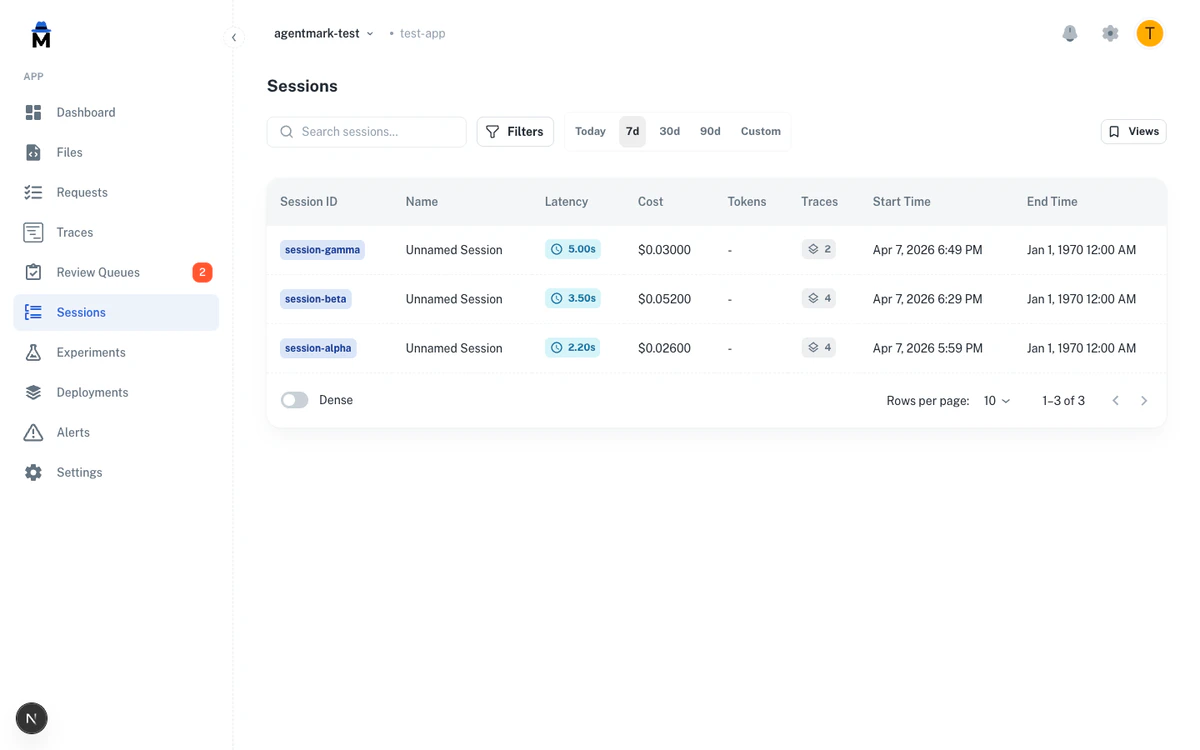 The Sessions page lists each session with columns for ID, name, user, duration, cost, tokens, and trace count. Search by session ID or name, pick a date range, and sort by any column.
The **Filters** button opens the same filter builder as the Traces page, with session fields: **User ID** (string operators), **Cost (\$)**, **Tokens**, and **Latency (ms)** (numeric operators), and **Tags** (equals, not equals, contains).
Access sessions under the **Sessions** tab in the Dashboard or at `http://localhost:3000` locally.
## Sessions API
You can list sessions and retrieve a session's traces programmatically using the CLI or REST API. Both the local dev server and the AgentMark Cloud gateway expose `/v1/sessions` and `/v1/sessions/{sessionId}/traces`.
```bash theme={null}
# List sessions
curl "https://api.agentmark.co/v1/sessions?limit=10" \
-H "Authorization: Bearer am_live_abc123" \
-H "X-Agentmark-App-Id: app_abc123"
# List the traces belonging to a session
curl "https://api.agentmark.co/v1/sessions/session-1712764245/traces" \
-H "Authorization: Bearer am_live_abc123" \
-H "X-Agentmark-App-Id: app_abc123"
```
```bash theme={null}
# No auth required locally
curl "http://localhost:9418/v1/sessions?limit=10"
curl "http://localhost:9418/v1/sessions/session-1712764245/traces"
```
Both endpoints support pagination with `limit` and `offset`. The list endpoint also supports free-text filtering with `search`, date-range filtering with `start_date` and `end_date`, and sorting with `sort_by` and `sort_order`.
See the [Sessions API reference](/api-reference/overview) for full request and response details.
## Best practices
* **Use consistent session IDs**: `session-${userId}-${Date.now()}`, not `${Math.random()}`
* **Provide descriptive names**: `"Customer Support: Billing Issue #4532"`, not `"Session 1"`
* **Limit session scope**: one ticket, one conversation, one batch job
* **Create new sessions for new interactions**: don't reuse sessions across unrelated workflows
Full span() API reference
Find sessions across dimensions
The Sessions page lists each session with columns for ID, name, user, duration, cost, tokens, and trace count. Search by session ID or name, pick a date range, and sort by any column.
The **Filters** button opens the same filter builder as the Traces page, with session fields: **User ID** (string operators), **Cost (\$)**, **Tokens**, and **Latency (ms)** (numeric operators), and **Tags** (equals, not equals, contains).
Access sessions under the **Sessions** tab in the Dashboard or at `http://localhost:3000` locally.
## Sessions API
You can list sessions and retrieve a session's traces programmatically using the CLI or REST API. Both the local dev server and the AgentMark Cloud gateway expose `/v1/sessions` and `/v1/sessions/{sessionId}/traces`.
```bash theme={null}
# List sessions
curl "https://api.agentmark.co/v1/sessions?limit=10" \
-H "Authorization: Bearer am_live_abc123" \
-H "X-Agentmark-App-Id: app_abc123"
# List the traces belonging to a session
curl "https://api.agentmark.co/v1/sessions/session-1712764245/traces" \
-H "Authorization: Bearer am_live_abc123" \
-H "X-Agentmark-App-Id: app_abc123"
```
```bash theme={null}
# No auth required locally
curl "http://localhost:9418/v1/sessions?limit=10"
curl "http://localhost:9418/v1/sessions/session-1712764245/traces"
```
Both endpoints support pagination with `limit` and `offset`. The list endpoint also supports free-text filtering with `search`, date-range filtering with `start_date` and `end_date`, and sorting with `sort_by` and `sort_order`.
See the [Sessions API reference](/api-reference/overview) for full request and response details.
## Best practices
* **Use consistent session IDs**: `session-${userId}-${Date.now()}`, not `${Math.random()}`
* **Provide descriptive names**: `"Customer Support: Billing Issue #4532"`, not `"Session 1"`
* **Limit session scope**: one ticket, one conversation, one batch job
* **Create new sessions for new interactions**: don't reuse sessions across unrelated workflows
Full span() API reference
Find sessions across dimensions
Have questions?
Reach out any time: