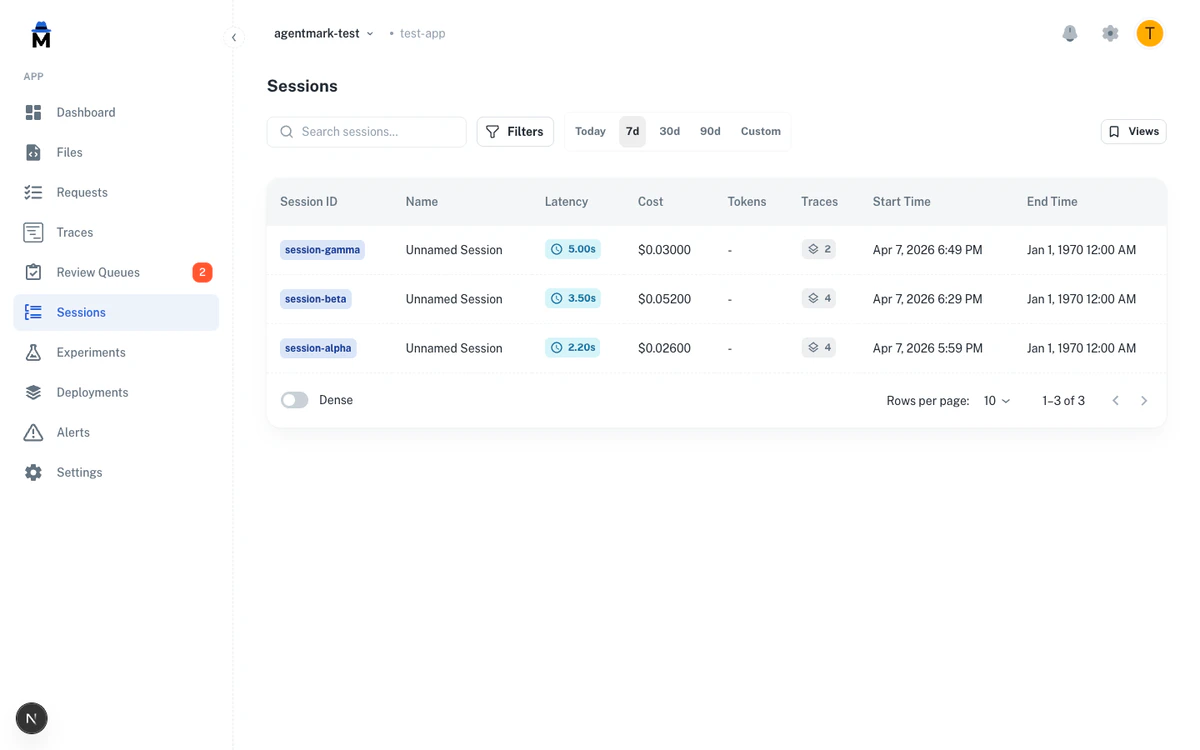
Sessions group related traces together, making it easier to monitor and debug complex workflows. Track entire user interactions or multi-step processes as a single unit.

What Are Sessions?

A session represents a logical grouping of traces. Common examples:
  • A conversation with a user
  • A batch processing job
  • A multi-step workflow
  • A user’s session on your application
Sessions help maintain context across multiple traces, giving you the full picture of your application’s behavior.

Creating Sessions

Include session information in your telemetry metadata:
import { client } from './agentmark.client';
import { generateText } from 'ai';

// Create session identifiers
const sessionId = `session-${Date.now()}`;
const sessionName = 'Customer Support Chat #12345';

async function handleUserMessage(message: string) {
  const prompt = await client.loadTextPrompt('chat.prompt.mdx');

  const input = await prompt.format({
    props: { message },
    telemetry: {
      isEnabled: true,
      functionId: 'chat-handler',
      metadata: {
        userId: 'user-123',
        sessionId: sessionId,
        sessionName: sessionName
      }
    }
  });

  const result = await generateText(input);
  return result;
}

// All these calls belong to the same session
await handleUserMessage('Hello!');
await handleUserMessage('What can you help me with?');
await handleUserMessage('Thanks!');

Session Metadata

Required fields:
  • sessionId - Unique identifier for the session
  • sessionName - Human-readable name
Optional but recommended:
  • userId - Associate with a specific user
  • environment - Track by environment (dev, staging, prod)
  • Custom fields - Any additional context
telemetry: {
  isEnabled: true,
  functionId: 'workflow-handler',
  metadata: {
    userId: 'user-123',
    sessionId: 'session-abc',
    sessionName: 'Data Processing Workflow',
    environment: 'production',
    workflowType: 'batch-import',
    recordCount: 1000
  }
}

Session Patterns

Conversational Sessions

Track multi-turn conversations:
class ChatSession {
  private sessionId: string;
  private sessionName: string;

  constructor(userId: string) {
    this.sessionId = `chat-${userId}-${Date.now()}`;
    this.sessionName = `Chat with ${userId}`;
  }

  async sendMessage(message: string) {
    const prompt = await client.loadTextPrompt('chat.prompt.mdx');

    const input = await prompt.format({
      props: { message },
      telemetry: {
        isEnabled: true,
        functionId: 'chat-message',
        metadata: {
          sessionId: this.sessionId,
          sessionName: this.sessionName,
          userId: userId
        }
      }
    });

    return await generateText(input);
  }
}

Workflow Sessions

Track multi-step workflows:
async function processOrder(orderId: string) {
  const sessionId = `order-${orderId}`;
  const sessionName = `Order Processing: ${orderId}`;

  const baseTelemetry = {
    isEnabled: true,
    metadata: {
      sessionId,
      sessionName,
      orderId
    }
  };

  // Step 1: Validate order
  const validatePrompt = await client.loadTextPrompt('validate-order.prompt.mdx');
  const validateInput = await validatePrompt.format({
    props: { orderId },
    telemetry: { ...baseTelemetry, functionId: 'validate-order' }
  });
  await generateText(validateInput);

  // Step 2: Process payment
  const paymentPrompt = await client.loadTextPrompt('process-payment.prompt.mdx');
  const paymentInput = await paymentPrompt.format({
    props: { orderId },
    telemetry: { ...baseTelemetry, functionId: 'process-payment' }
  });
  await generateText(paymentInput);

  // Step 3: Send confirmation
  const confirmPrompt = await client.loadTextPrompt('send-confirmation.prompt.mdx');
  const confirmInput = await confirmPrompt.format({
    props: { orderId },
    telemetry: { ...baseTelemetry, functionId: 'send-confirmation' }
  });
  await generateText(confirmInput);
}

Batch Processing Sessions

Track batch jobs:
async function processBatch(items: string[]) {
  const sessionId = `batch-${Date.now()}`;
  const sessionName = `Batch Processing: ${items.length} items`;

  for (const item of items) {
    const prompt = await client.loadTextPrompt('process-item.prompt.mdx');

    const input = await prompt.format({
      props: { item },
      telemetry: {
        isEnabled: true,
        functionId: 'batch-item-processor',
        metadata: {
          sessionId,
          sessionName,
          batchSize: items.length,
          itemId: item
        }
      }
    });

    await generateText(input);
  }
}

Session Lifecycle

Start: Create session ID when workflow begins
const sessionId = `workflow-${workflowId}-${Date.now()}`;
Use: Include in all related traces
telemetry: {
  metadata: { sessionId, sessionName }
}
End: Session ends naturally when traces stop New Session: Create new session for new user interaction
// Don't reuse sessions across different users or workflows
const newSessionId = `session-${Date.now()}`;

Best Practices

Use consistent session IDs:
// ❌ Bad - Different IDs for same session
telemetry: { metadata: { sessionId: `${Math.random()}` } }

// ✅ Good - Same ID throughout session
const sessionId = `session-${userId}-${Date.now()}`;
telemetry: { metadata: { sessionId } }
Provide descriptive names:
// ❌ Bad
sessionName: "Session 1"

// ✅ Good
sessionName: "Customer Support: Billing Issue #4532"
Include relevant context:
telemetry: {
  isEnabled: true,
  functionId: 'support-handler',
  metadata: {
    sessionId: sessionId,
    sessionName: 'Customer Support Chat',
    userId: user.id,
    userTier: user.tier,
    issueType: 'billing',
    priority: 'high'
  }
}
Limit session scope:
// ❌ Bad - Session too broad
const sessionId = 'user-123-session'; // Used forever

// ✅ Good - Session has clear boundaries
const sessionId = `support-${ticketId}-${Date.now()}`; // One ticket
Clean up periodically:
// For long-running applications, create new sessions
class LongRunningService {
  private sessionId: string;
  private sessionStartTime: number;

  async checkSessionRenewal() {
    const hoursSinceStart = (Date.now() - this.sessionStartTime) / 3600000;

    if (hoursSinceStart > 24) {
      // Create new session after 24 hours
      this.sessionId = `service-${Date.now()}`;
      this.sessionStartTime = Date.now();
    }
  }
}

Viewing Sessions

Sessions are viewable in the AgentMark platform dashboard where you can:
  • See all traces grouped by session
  • Analyze session duration and performance
  • Filter traces within a session
  • Compare sessions
  • Debug multi-step workflows

Next Steps