

Write automated evaluators in code or CLI. Use the Dashboard for human annotations, shared experiment results, and visual score comparisons.Documentation Index
Fetch the complete documentation index at: https://docs.agentmark.co/llms.txt
Use this file to discover all available pages before exploring further.
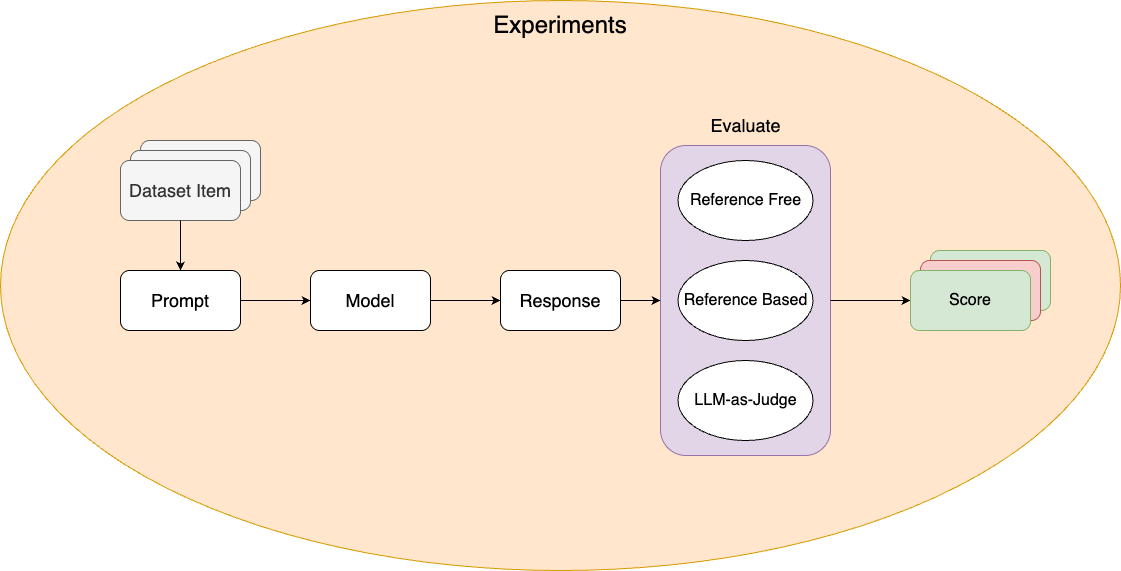
Why test prompts?
LLM outputs are non-deterministic — the same prompt can produce different results. Testing helps you:- Catch regressions — Know when prompt changes break existing functionality
- Validate quality — Ensure outputs meet standards across diverse scenarios
- Measure improvements — Quantify whether prompt iterations actually perform better
- Build confidence — Deploy changes backed by data, not guesswork
Testing workflow
Prerequisites: You must have
npx agentmark dev running in a separate terminal before running experiments.Core concepts
Datasets
Collections of test inputs (and optionally expected outputs) stored as JSONL files. Define the scenarios your prompt should handle — common cases, edge cases, failure modes.- Cloud
- Local
Create and manage datasets through the Dashboard UI, or use local JSONL files that sync when connected.
Evaluations
Functions that score prompt outputs and determine pass/fail status. Define your success criteria — what makes an output correct, high-quality, or acceptable.Experiments
Run a prompt against a dataset with evaluations. Use them to validate prompt changes, compare model configurations, and enforce quality thresholds.- Cloud
- Local
Run experiments from the Dashboard and review results with visual score comparisons, charts, and per-item drill-down.
Annotations
Cloud feature. Annotations are available in the AgentMark Dashboard.
Testing strategies
- Start small (5-10 cases), then grow with real data
- Test multiple dimensions — accuracy, completeness, tone, format
- Version control everything — datasets live alongside prompts in your repo
- Run in CI/CD — gate deployments on pass-rate thresholds
Programmatic access
Query datasets, experiments, runs, and prompt execution logs via the REST API or theagentmark api CLI command. Use this to build custom reporting, export evaluation results to external tools, or integrate experiment data into CI/CD pipelines.
/v1/* wire contract. A small number of routes are environment-specific — see API reference → Available endpoints for the Where column.
Next steps
Datasets
Create test datasets
Writing Evals
Write evaluation functions
Running Experiments
Execute tests with the CLI or Dashboard
Annotations
Human-in-the-loop scoring
Have Questions?
We’re here to help! Choose the best way to reach us:
- Email us at hello@agentmark.co for support
- Schedule an Enterprise Demo to learn about our business solutions