

agentmark.json that declares what it measures (boolean, numeric, or categorical), and a function in code that produces the score. AgentMark binds the two when the config key and the function key share the same name. In Cloud, score configs sync to the Dashboard and you pick evals to run from the New Experiment dialog. In Local, you register eval functions in your client and run them through the CLI.
Start with evals first - Build your evaluation framework before writing prompts. Evals give you a way to measure what works and iterate on it.
- Cloud
- Local
Evals in the Dashboard
Cloud evals come from two pieces that you maintain in your repo:- Score configs declared in
agentmark.jsonunderscores. These define what each eval scores on (boolean, numeric, or categorical) and sync to AgentMark Cloud through the deployment pipeline. - Eval functions on your deployed handler. These run during experiments and produce the scores.
Declare score configs
Add ascores block to agentmark.json. Each key is an eval name that your eval functions return scores for.agentmark.json
{
  "scores": {
    "accuracy": {
      "type": "boolean",
      "description": "Was the response factually correct?"
    },
    "tone": {
      "type": "categorical",
      "description": "Response tone classification",
      "categories": [
        { "label": "professional", "value": 1 },
        { "label": "casual", "value": 0.5 },
        { "label": "inappropriate", "value": 0 }
      ]
    }
  }
}
scores schema, and the Local tab for writing the eval functions themselves.Pick evals when you run an experiment
In the New Experiment dialog, the Evaluations field is a multi-select populated from the evals your deployed handler registers. Selecting a prompt auto-fills the evaluations from itstest_settings frontmatter.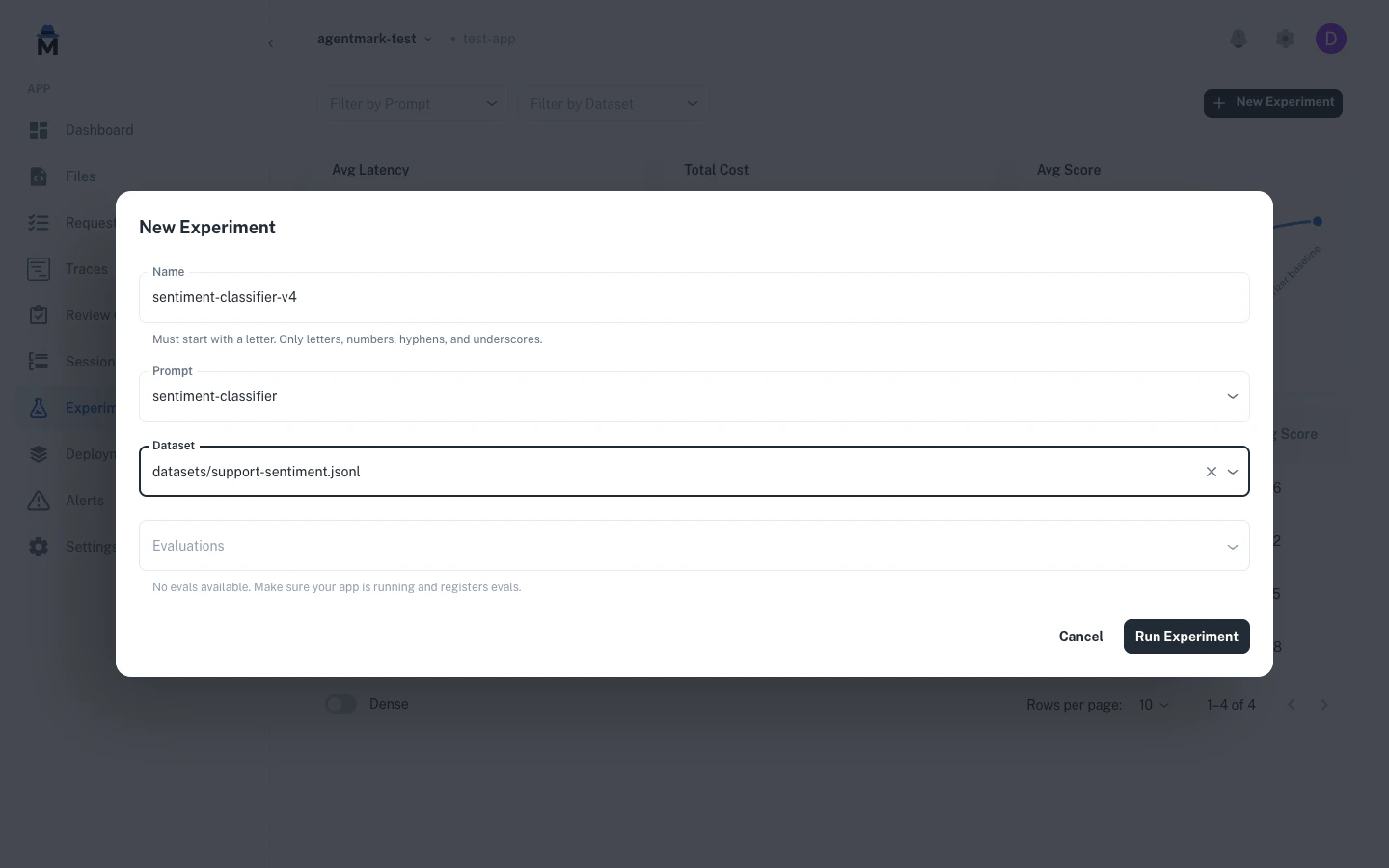
See results as scores
Eval results appear as per-row scores and run-level aggregates in the experiment detail view.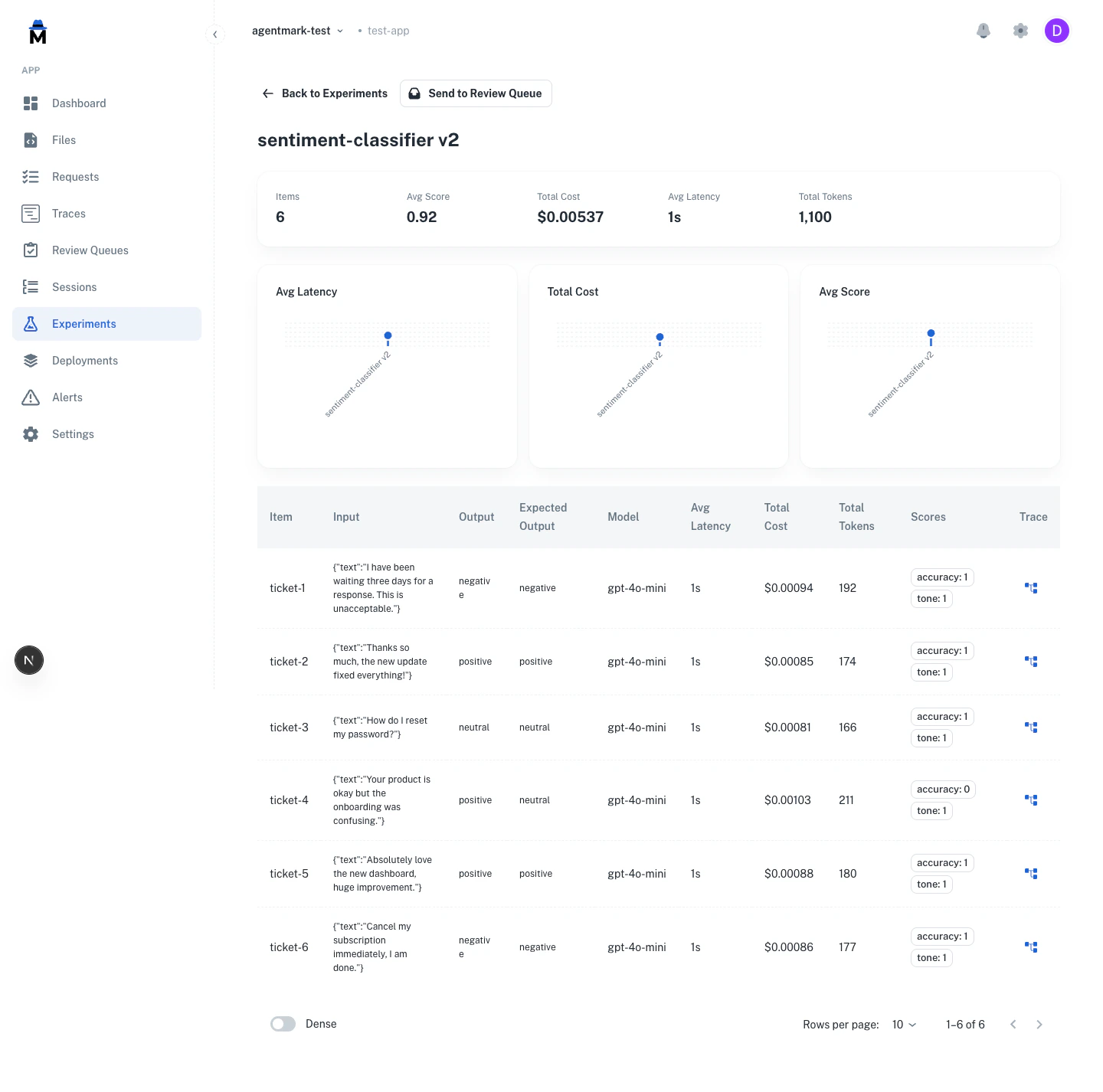
The same score configs power human annotation. Reviewers score traces against the configs you declare in
agentmark.json. See Human annotation.Quick start
1. Define score schemas inagentmark.json:agentmark.json
{
  "scores": {
    "accuracy": {
      "type": "boolean",
      "description": "Was the response factually correct?"
    }
  }
}
{passed, score, reason}:- TypeScript
- Python
export const accuracy = async ({ output, expectedOutput, input }) => {
  const match = output.trim() === (expectedOutput ?? '').trim();
  return {
    passed: match,
    score: match ? 1.0 : 0.0,
    reason: match ? undefined : `Expected "${expectedOutput}", got "${output}"`
  };
};
from agentmark.prompt_core import EvalParams, EvalResult

def accuracy(params: EvalParams) -> EvalResult:
    output = str(params["output"]).strip()
    expected = str(params.get("expectedOutput", "")).strip()
    match = output == expected

    return {
        "passed": match,
        "score": 1.0 if match else 0.0,
        "reason": None if match else f'Expected "{expected}", got "{output}"'
    }
createAgentMark({ loader, evals: { accuracy } }) (Python: create_agentmark(loader=loader, evals={"accuracy": accuracy})). See Registering evals below.4. Reference in your prompt’s frontmatter:---
name: sentiment-classifier
test_settings:
dataset: ./datasets/sentiment.jsonl
evals:
- accuracy
---
Writing eval functions
Eval functions are plain functions that score prompt outputs. Score schemas are defined separately inagentmark.json, and the two are connected by name.- TypeScript
- Python
const evals = {
  accuracy: async ({ output, expectedOutput }) => {
    const match = output.trim() === expectedOutput?.trim();
    return { passed: match, score: match ? 1 : 0 };
  },
  tone: async ({ output }) => {
    const isProfessional = !output.includes("lol") && !output.includes("!!!");
    return {
      passed: isProfessional,
      label: isProfessional ? "professional" : "casual",
    };
  },
};
from agentmark.prompt_core import EvalParams, EvalResult

evals = {
    "accuracy": lambda params: {
        "passed": str(params["output"]).strip() == str(params.get("expectedOutput", "")).strip(),
        "score": 1.0 if str(params["output"]).strip() == str(params.get("expectedOutput", "")).strip() else 0.0,
    },
    "tone": lambda params: {
        "passed": "lol" not in str(params["output"]) and "!!!" not in str(params["output"]),
        "label": "professional" if ("lol" not in str(params["output"]) and "!!!" not in str(params["output"])) else "casual",
    },
}
agentmark.json so they are available in the Dashboard:agentmark.json
{
  "scores": {
    "accuracy": {
      "type": "boolean",
      "description": "Was the response factually correct?"
    },
    "tone": {
      "type": "categorical",
      "description": "Response tone classification",
      "categories": [
        { "label": "professional", "value": 1 },
        { "label": "casual", "value": 0.5 },
        { "label": "inappropriate", "value": 0 }
      ]
    }
  }
}
agentmark.json are synced to AgentMark Cloud through the deployment pipeline and remain available in the Dashboard across deployments.Function signature
- TypeScript
- Python
interface EvalParams {
  input: string | Record<string, unknown> | Array<Record<string, unknown> | string>;
  output: string | Record<string, unknown> | Array<Record<string, unknown> | string>;
  expectedOutput?: string;  // Maps from dataset's expected_output field
  metadata?: Record<string, unknown> | null;
}

interface EvalResult {
  score?: number;    // Numeric score (0-1 recommended)
  passed?: boolean;  // Pass/fail status (used by --threshold)
  label?: string;    // Classification label for categorization
  reason?: string;   // Explanation for the result
}

type EvalFunction = (params: EvalParams) => Promise<EvalResult> | EvalResult;
from typing import Any, TypedDict, Callable, Awaitable

class EvalParams(TypedDict, total=False):
    input: str | dict[str, Any] | list[dict[str, Any] | str]
    output: str | dict[str, Any] | list[dict[str, Any] | str]
    expectedOutput: str | None  # Note: camelCase in Python
    metadata: dict[str, Any] | None

class EvalResult(TypedDict, total=False):
    passed: bool      # Pass/fail status
    score: float      # Numeric score (0-1)
    reason: str       # Explanation for failure
    label: str        # Custom label for categorization

# Both sync and async functions are supported
EvalFunction = Callable[[EvalParams], EvalResult | Awaitable[EvalResult]]
Registering evals
Eval functions register on the client (or, for in-process experiment runs, on the call itself):- Cloud execution (Dashboard Run, managed experiments): register them on
createAgentMark, the client you hand tocreateWebhookRunner. The runner sources them from the client, so they both run in experiments and list in the New Experiment dialog. - In your own app: pass them as
evaluatorstosdk.runExperiment.
- Cloud execution
- In your own app
Register the eval map on the client, then build the runner that AgentMark Cloud dispatches to from it. See Connect your SDK for the
executor that wraps your SDK.import { createAgentMark } from "@agentmark-ai/prompt-core";
import { createWebhookRunner } from "@agentmark-ai/sdk";
const client = createAgentMark({
loader,
evals: {
accuracy: accuracyFn,
contains_keyword: containsKeywordFn,
},
});
const runner = createWebhookRunner({ client, executor });
export default (body) => runner.dispatch(body);
Pass the same functions as
evaluators to runExperiment. Each evaluator takes { output, expectedOutput } and returns a score.const result = await sdk.runExperiment({
experimentKey: "support-quality",
dataset,
task: async (input) => {
const { messages, text_config } = await (
await client.loadTextPrompt("support.prompt.mdx")
).format({ props: input });
const { text } = await generateText({
model: openai(text_config.model_name.replace(/^openai\//, "")),
messages,
});
return text;
},
evaluators: [
{ name: "accuracy", evaluate: accuracyFn },
{ name: "contains_keyword", evaluate: containsKeywordFn },
],
});
Eval function registry
Eval functions are plain functions mapped by name. In TypeScript, useRecord<string, EvalFunction>. In Python, use dict[str, EvalFunction]. Score schemas are defined separately in agentmark.json and deployed to AgentMark Cloud. The eval functions run during experiments and are connected to scores by name.- TypeScript
- Python
import type { EvalFunction } from "@agentmark-ai/prompt-core";

const evals: Record<string, EvalFunction> = {
  accuracy: accuracyFn,
  relevance: relevanceFn,
};

// Standard object operations
evals["new_eval"] = newEvalFn;
const fn = evals["accuracy"];
const exists = "accuracy" in evals;
delete evals["accuracy"];
const names = Object.keys(evals);
from agentmark.prompt_core import EvalFunction

evals: dict[str, EvalFunction] = {
    "accuracy": accuracy_fn,
    "relevance": relevance_fn,
}

# Standard dict operations
evals["new_eval"] = new_eval_fn
fn = evals["accuracy"]
exists = "accuracy" in evals
del evals["accuracy"]
names = list(evals.keys())
All fields in
EvalResult are optional. Return whichever fields are relevant to your eval. The passed field is used by the CLI --threshold flag to calculate pass rates.Evaluation types
Reference-based (ground truth)
Compare outputs against known correct answers:export const exact_match = async ({ output, expectedOutput }) => {
return {
passed: output === expectedOutput,
score: output === expectedOutput ? 1 : 0
};
};
Reference-free (heuristic)
Check structural requirements without ground truth:export const has_required_fields = async ({ output }) => {
const required = ['name', 'email', 'summary'];
const hasAll = required.every(field => output[field]);
return {
passed: hasAll,
score: hasAll ? 1 : 0,
reason: hasAll ? undefined : 'Missing required fields'
};
};
Model-graded (LLM-as-judge)
Use an LLM to evaluate subjective criteria:import { generateObject } from 'ai';
import { openai } from '@ai-sdk/openai';
import { z } from 'zod';
export const tone_eval = async ({ output, expectedOutput }) => {
const { object } = await generateObject({
model: openai('gpt-5-mini'),
schema: z.object({ passed: z.boolean(), reasoning: z.string() }),
prompt: `Evaluate if this response has appropriate ${expectedOutput} tone:\n\n${output}`,
temperature: 0.1,
});
return {
passed: object.passed,
score: object.passed ? 1 : 0,
reason: object.reasoning,
};
};
Combine approaches - Use reference-based for correctness, reference-free for structure, and model-graded for subjective quality.
Common patterns
Classification
- TypeScript
- Python
export const classification_accuracy = async ({ output, expectedOutput }) => {
  const match = output.trim().toLowerCase() === expectedOutput.trim().toLowerCase();
  return {
    passed: match,
    score: match ? 1 : 0,
    reason: match ? undefined : `Expected ${expectedOutput}, got ${output}`
  };
};
def classification_accuracy(params: EvalParams) -> EvalResult:
    output = str(params["output"]).strip().lower()
    expected = str(params["expectedOutput"]).strip().lower()
    match = output == expected

    return {
        "passed": match,
        "score": 1.0 if match else 0.0,
        "reason": None if match else f"Expected {expected}, got {output}"
    }
Contains keyword
- TypeScript
- Python
export const contains_keyword = async ({ output, expectedOutput }) => {
  const contains = output.includes(expectedOutput);
  return {
    passed: contains,
    score: contains ? 1 : 0,
    reason: contains ? undefined : `Output missing "${expectedOutput}"`
  };
};
def contains_keyword(params: EvalParams) -> EvalResult:
    output = str(params["output"])
    expected = str(params["expectedOutput"])
    contains = expected in output

    return {
        "passed": contains,
        "score": 1.0 if contains else 0.0,
        "reason": None if contains else f'Output missing "{expected}"'
    }
Field presence
export const required_fields = async ({ output }) => {
  const required = ['name', 'email', 'message'];
  const missing = required.filter(field => !(field in output));

  return {
    passed: missing.length === 0,
    score: (required.length - missing.length) / required.length,
    reason: missing.length > 0 ? `Missing: ${missing.join(', ')}` : undefined
  };
};
Length check
export const length_check = async ({ output }) => {
  const length = output.length;
  const passed = length >= 10 && length <= 500;
  return {
    passed,
    score: passed ? 1 : 0,
    reason: passed ? undefined : `Length ${length} outside range [10, 500]`
  };
};
Format validation
export const email_format = async ({ output }) => {
  const emailRegex = /^[^\s@]+@[^\s@]+\.[^\s@]+$/;
  const passed = emailRegex.test(output);
  return {
    passed,
    score: passed ? 1 : 0,
    reason: passed ? undefined : 'Invalid email format'
  };
};
Graduated scoring
Uselabel field to categorize results:export const sentiment_gradual = async ({ output, expectedOutput }) => {
if (output === expectedOutput) {
return { passed: true, score: 1.0, label: 'exact_match' };
}
const partialMatches = {
'positive': ['very positive', 'somewhat positive'],
'negative': ['very negative', 'somewhat negative']
};
if (partialMatches[expectedOutput]?.includes(output)) {
return {
passed: true,
score: 0.7,
label: 'partial_match',
reason: 'Close semantic match'
};
}
return {
passed: false,
score: 0,
label: 'no_match',
reason: `Expected ${expectedOutput}, got ${output}`
};
};
exact_match, partial_match, no_match) to understand patterns.LLM-as-judge
Using AgentMark prompts
Defining the judge as an AgentMark prompt is the recommended approach.1. Create eval prompt (agentmark/evals/tone-judge.prompt.mdx):---
name: tone-judge
object_config:
model_name: openai/gpt-5-mini
temperature: 0.1
schema:
type: object
properties:
passed:
type: boolean
reasoning:
type: string
---
<System>
You are evaluating whether an AI response has appropriate professional tone.
First explain your reasoning step-by-step, then provide your final judgment.
</System>
<User>
**Output to evaluate:**
{props.output}
**Expected tone:**
{props.expectedOutput}
</User>
import { client } from './agentmark.client';
import { generateObject, jsonSchema } from 'ai';
import { openai } from '@ai-sdk/openai';

export const tone_check = async ({ output, expectedOutput }) => {
  const evalPrompt = await client.loadObjectPrompt('evals/tone-judge.prompt.mdx');
  const { messages, object_config } = await evalPrompt.format({
    props: { output, expectedOutput }
  });
  const { object } = await generateObject({
    model: openai(object_config.model_name.replace(/^openai\//, "")),
    messages,
    schema: jsonSchema(object_config.schema),
  });

  return {
    passed: object.passed,
    score: object.passed ? 1 : 0,
    reason: object.reasoning,
  };
};
LLM-as-judge best practices
Configuration:- Use low temperature (0.1-0.3) for consistency
- Ask for reasoning before judgment (chain-of-thought)
- Use binary scoring (PASS/FAIL) not scales (1-10)
- Test one dimension at a time
- Use a stronger model to grade weaker ones (for example, GPT-5.1 grading GPT-5-mini outputs)
- Avoid grading a model with itself
- Validate with human evaluation before scaling
- Use sparingly - slower and more expensive
- Reserve for subjective criteria
- Watch for position bias, verbosity bias, self-enhancement bias
Avoid exact-match for open-ended outputs - Use only for classification or short outputs. For longer text, use semantic similarity or LLM-based evaluation.
Domain-specific evals
RAG (retrieval-augmented generation)
extractClaims and isSupported are placeholders you implement for your domain. These examples are templates, not runnable code.export const faithfulness = async ({ output, input }) => {
const context = input.retrieved_context;
const claims = extractClaims(output);
const supported = claims.every(claim => isSupported(claim, context));
return {
passed: supported,
score: supported ? 1 : 0,
reason: supported ? undefined : 'Output contains unsupported claims'
};
};
export const answer_relevancy = async ({ output, input }) => {
const isRelevant = output.toLowerCase().includes(input.query.toLowerCase());
return {
passed: isRelevant,
score: isRelevant ? 1 : 0,
reason: isRelevant ? undefined : 'Answer not relevant to query'
};
};
Agent / tool calling
export const tool_correctness = async ({ output, expectedOutput }) => {
  const correctTool = output.tool === expectedOutput.tool;
  const correctParams = JSON.stringify(output.parameters) ===
                       JSON.stringify(expectedOutput.parameters);

  return {
    passed: correctTool && correctParams,
    score: correctTool && correctParams ? 1 : 0.5,
    reason: !correctTool ? 'Wrong tool selected' :
            !correctParams ? 'Incorrect parameters' : undefined
  };
};
Best practices
- Test one thing per eval - separate functions for different criteria
- Provide helpful failure reasons for debugging
- Use meaningful names (
sentiment_accuracynoteval1) - Keep scores in 0-1 range
- Make evals deterministic and consistent (avoid flaky tests)
- Validate general behavior, not specific outputs (avoid overfitting)
Next steps
Datasets
Create test datasets
Running experiments
Run your evaluations
Testing overview
Learn testing concepts
Have questions?
Reach out any time:
- Email us at hello@agentmark.co for support
- Schedule an Enterprise Demo to learn about our business solutions