

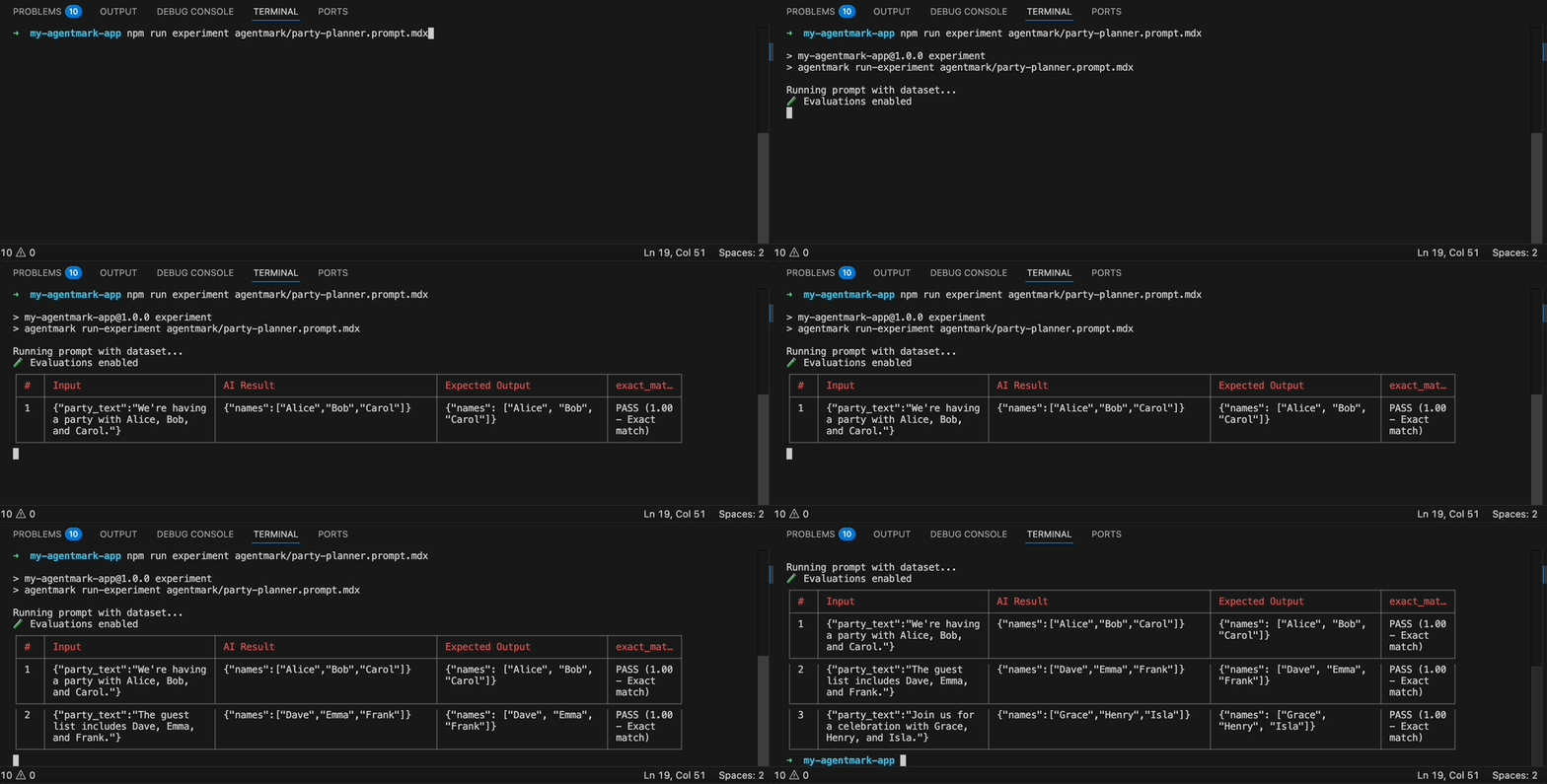
npx agentmark run-experiment executing against a dataset: each row is processed, the AI output is scored, and a results table prints to stdout with pass/fail status per evaluator.
Run prompts against datasets with automatic evaluation to validate quality and consistency.
CLI usage
Quick start
- Dataset configured in prompt frontmatter
- Development server running (
npx agentmark dev) - Optional: Evaluation functions defined
Keep
npx agentmark dev running in a separate terminal. The run-experiment command talks to it on port 9417.Full command signature
--server flag defaults to the AGENTMARK_WEBHOOK_URL environment variable if set, otherwise http://localhost:9417.
Command options
Skip evaluations (output-only mode):passed field.
Dataset sampling (see Dataset Sampling below):
Dataset sampling
Run experiments on a subset of your dataset without modifying the dataset file. The three sampling modes are mutually exclusive — use only one per run. Random sample (--sample <percent>):
Run on a random N% of rows. Useful for quick smoke tests against large datasets.
--rows <spec>):
Select individual rows by zero-based index. Supports comma-separated indices and ranges.
--split <spec>):
Split the dataset into train and test portions. Run only the train portion or only the test portion.
Without
--seed, --split uses positional assignment: the first N% of rows are “train” and the rest are “test”. With --seed, each row is assigned to train or test by a deterministic hash — the order in the file does not matter.--seed:
The --seed flag guarantees the same rows are selected every time, across TypeScript and Python. Pass the same seed to get identical results on any machine or language runtime.
Output example
| # | Input | AI Result | Expected Output | sentiment_check |
|---|---|---|---|---|
| 1 | {"text":"I love it"} | positive | positive | PASS (1.00) |
| 2 | {"text":"Terrible"} | negative | negative | PASS (1.00) |
| 3 | {"text":"It's okay"} | neutral | neutral | PASS (1.00) |
.mdx source files and pre-built .json files (from npx agentmark build). Media outputs (images, audio) are saved to .agentmark-outputs/ with clickable file paths.
How it works
Therun-experiment command:
- Loads your prompt file (
.mdxor pre-built.json) and parses the frontmatter - Reads the dataset specified in
test_settings.dataset - Sends the prompt and dataset to the dev server (default:
http://localhost:9417) - The server runs the prompt against each dataset row
- Evaluates results using the evals specified in
test_settings.evals - Streams results back to the CLI as they complete
- Displays formatted output (table, CSV, JSON, or JSONL)
Configuration
Link dataset and evals in prompt frontmatter:test_settings.props:
Workflow
1. Develop prompts - Iterate on your prompt design 2. Create datasets - Add test cases covering your scenarios 3. Write evaluations - Define success criteria 4. Run experiments - Test against datasetSDK usage
Run experiments programmatically usingformatWithDataset():
dataset- The test case (inputandexpected_output)formatted- The formatted prompt ready for your AI SDKevals- List of evaluation names to runtype- Always"dataset"
FormatWithDatasetOptions):
datasetPath?: string- Override dataset from frontmatterformat?: 'ndjson' | 'json'- Buffer all rows ('json') or stream as available ('ndjson', default)
- Custom test logic in your test framework
- Fine-grained control over test execution
- Integrating with existing test infrastructure
- Running experiments in application code
Troubleshooting
CLI issues
Dataset not found:- Check dataset path in frontmatter
- Verify file exists and is valid JSONL
- Ensure
npx agentmark devis running - Check ports are available (default webhook port: 9417)
- Verify
--serverURL if using a custom server
- Each line must be valid JSON
- Required:
inputfield - Optional:
expected_outputfield
- Add
evalstotest_settingsin frontmatter - Or use
--skip-evalflag for output-only mode
- The
--thresholdflag requires evals that return apassedfield - Verify your eval functions return
{ passed: true/false, ... }
- Only one of
--sample,--rows, or--splitmay be used at a time --seedcan be combined with any of them
Programmatic access
You can query experiment results, run traces, and prompt file listings via the REST API or theagentmark api CLI command. Use this to build custom reporting, export results to external tools, or integrate experiment data into CI/CD pipelines.
experiments ships on Cloud + Local. prompts is Local-only today — Cloud returns 501 not_available_on_cloud. The legacy /v1/runs/{runId}/traces endpoint is deprecated but still works on Local for backwards compatibility; use /v1/traces?dataset_run_id=… in new code. Call GET /v1/capabilities to check which features a server supports at runtime.Next steps
Datasets
Create test datasets
Evaluations
Write evaluation functions
Testing overview
Learn testing concepts
Have Questions?
We’re here to help! Choose the best way to reach us:
- Email us at hello@agentmark.co for support
- Schedule an Enterprise Demo to learn about our business solutions