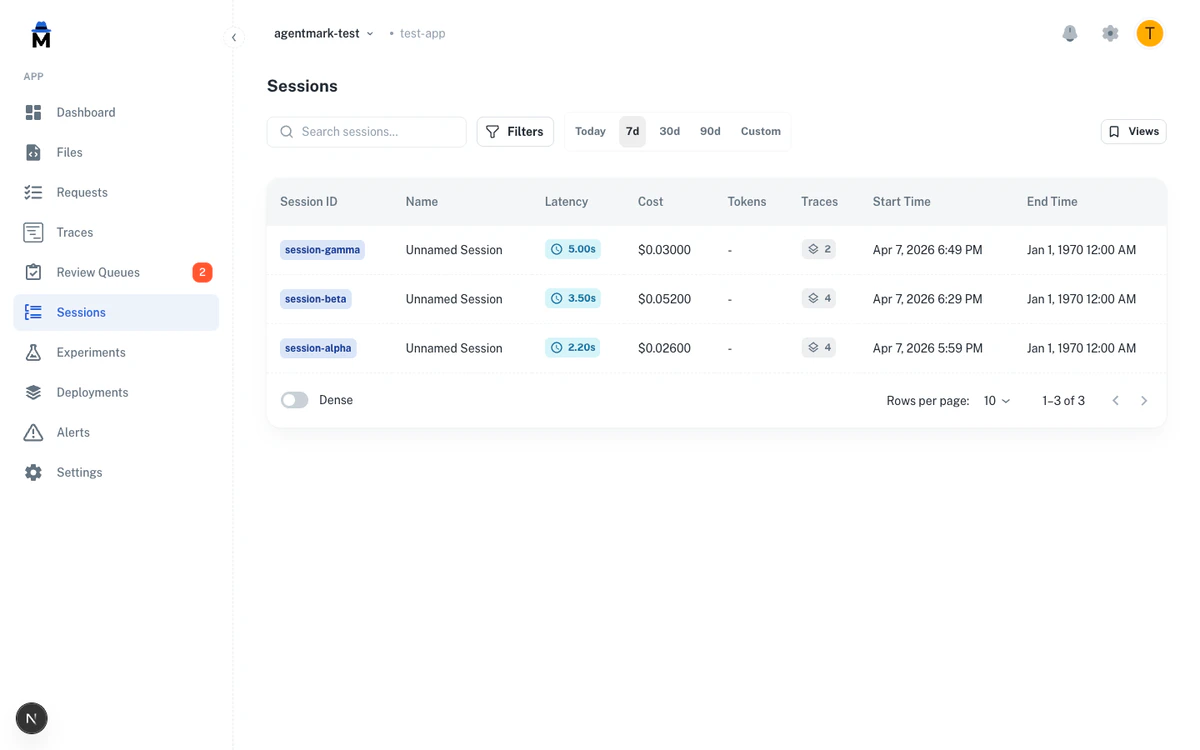
Sessions group related traces together, making it easier to monitor and debug complex workflows. Track entire user interactions or multi-step processes as a single unit.
What Are Sessions?
A session represents a logical grouping of traces. Common examples:
A conversation with a user
A batch processing job
A multi-step workflow
A user’s session on your application
Creating Sessions
There are two ways to create sessions: via the trace() function (recommended) or via telemetry metadata on individual prompt calls.
Using trace() with Session Options
import { trace } from "@agentmark-ai/sdk" ;
import { client } from "./agentmark.client" ;
import { generateText } from "ai" ;
const sessionId = `session- ${ Date . now () } ` ;
const { result : greeting } = await trace (
{
name: 'handle-greeting' ,
sessionId ,
sessionName: 'Customer Support Chat #12345' ,
userId: 'user-123'
},
async ( ctx ) => {
const prompt = await client . loadTextPrompt ( 'chat.prompt.mdx' );
const input = await prompt . format ({
props: { message: 'Hello!' },
telemetry: { isEnabled: true }
});
return await generateText ( input );
}
);
// Later, another trace in the same session
const { result : followUp } = await trace (
{
name: 'handle-follow-up' ,
sessionId ,
sessionName: 'Customer Support Chat #12345' ,
userId: 'user-123'
},
async ( ctx ) => {
const prompt = await client . loadTextPrompt ( 'chat.prompt.mdx' );
const input = await prompt . format ({
props: { message: 'What can you help me with?' },
telemetry: { isEnabled: true }
});
return await generateText ( input );
}
);
import time
from agentmark_sdk import trace
from agentmark_pydantic_ai_v0 import run_text_prompt
from agentmark_client import client
session_id = f "session- { int (time.time() * 1000 ) } "
async with trace(
name = "handle-greeting" ,
session_id = session_id,
session_name = "Customer Support Chat #12345" ,
user_id = "user-123"
) as ctx:
prompt = await client.load_text_prompt( "chat.prompt.mdx" )
params = await prompt.format( props = { "message" : "Hello!" })
greeting = await run_text_prompt(params)
async with trace(
name = "handle-follow-up" ,
session_id = session_id,
session_name = "Customer Support Chat #12345" ,
user_id = "user-123"
) as ctx:
prompt = await client.load_text_prompt( "chat.prompt.mdx" )
params = await prompt.format( props = { "message" : "What can you help me with?" })
follow_up = await run_text_prompt(params)
Using Telemetry Metadata
For cases where you don’t need explicit tracing, pass session info through telemetry metadata:
const sessionId = `session- ${ Date . now () } ` ;
async function handleUserMessage ( message : string ) {
const prompt = await client . loadTextPrompt ( 'chat.prompt.mdx' );
const input = await prompt . format ({
props: { message },
telemetry: {
isEnabled: true ,
functionId: 'chat-handler' ,
metadata: { userId: 'user-123' , sessionId , sessionName: 'Customer Support Chat' }
}
});
return await generateText ( input );
}
await handleUserMessage ( 'Hello!' );
await handleUserMessage ( 'What can you help me with?' );
session_id = f "session- { int (time.time() * 1000 ) } "
async def handle_user_message ( message : str ):
prompt = await client.load_text_prompt( "chat.prompt.mdx" )
params = await prompt.format(
props = { "message" : message},
telemetry = {
"isEnabled" : True ,
"functionId" : "chat-handler" ,
"metadata" : { "userId" : "user-123" , "sessionId" : session_id, "sessionName" : "Customer Support Chat" }
}
)
return await run_text_prompt(params)
await handle_user_message( "Hello!" )
await handle_user_message( "What can you help me with?" )
Viewing Sessions
Access sessions under the Sessions tab in the Dashboard or at http://localhost:3000 locally. Search by session ID or name, filter by date range and user, and sort by cost, tokens, duration, or trace count.
Sessions API
You can list and retrieve sessions programmatically using the CLI or REST API. The local dev server and cloud gateway expose the same endpoints, so you can query sessions locally during development.
CLI
REST API (cloud)
REST API (local)
# List sessions from the local dev server
agentmark api sessions list --limit 10
# Get a specific session with its traces
agentmark api sessions get < sessionI d >
# Target the cloud gateway
agentmark api sessions list --remote --limit 10
curl "https://api.agentmark.co/v1/sessions?limit=10" \
-H "Authorization: Bearer am_live_abc123" \
-H "X-Agentmark-App-Id: app_abc123"
curl "https://api.agentmark.co/v1/sessions/session-1712764245" \
-H "Authorization: Bearer am_live_abc123" \
-H "X-Agentmark-App-Id: app_abc123"
# No auth required locally
curl "http://localhost:9418/v1/sessions?limit=10"
curl "http://localhost:9418/v1/sessions/session-1712764245"
Both endpoints support pagination with limit and offset parameters. The list endpoint also supports filtering by name and userId.
See the Sessions API reference for full request and response details.
Best practices
Use consistent session IDs — session-${userId}-${Date.now()} not ${Math.random()}
Provide descriptive names — "Customer Support: Billing Issue #4532" not "Session 1"
Limit session scope — One ticket, one conversation, one batch job
Create new sessions for new interactions — Don’t reuse sessions across unrelated workflows
Tracing Setup Full trace() API reference
Filtering & Search Find sessions across dimensions
Have Questions? We’re here to help! Choose the best way to reach us: